
In October 2026, three separate vendors tied real intrusions to the same open-source tool. CrowdStrike linked it to attacks on South Korean finance, TrendAI to attacks on Japanese companies, and Microsoft to Storm-0940's campaign against cloud tenants. The tool was ARTEX, an autonomous AI pentest framework that plans and runs a penetration test with little human input. Everyone was asking what attackers do with it. We asked a narrower question: how safe is the tool itself?
The ARTEX AI pentest framework is an LLM multi-agent system. A planner agent breaks a goal into steps, worker agents run real security tools, and every result lands in a graph of assets and findings. We stood it up in an isolated lab and audited its own code. The headline: its two advertised safety controls, stay in scope and require approval, are enforced far more narrowly than their names suggest.
This post walks through what we tested, the three high-severity findings, three medium ones, what held up well, and what defenders should take from it.
Authorized lab research. Everything below ran against our own isolated instance (loopback only, no LLM key configured, no scan targets) using harmless marker services and fake data. No third-party system was touched. The findings are about insecure defaults and control placement, written up for teams who evaluate or hunt autonomous attack tooling.
Why the ARTEX AI Pentest Framework Matters Now
ARTEX went from niche GitHub project to named threat tooling in about three weeks.
- On 7 October 2026, CrowdStrike reported an unknown actor using ARTEX against South Korean financial firms.
- The original developer, Autumn-27, then said misuse ran against the tool's purpose and that updates and new releases would stop. The repository went private, according to Digital Today.
- On 21 October, Microsoft attributed attacks that followed the ConnectWise supply chain compromise to Storm-0940, a China state-aligned actor active since 2021, and said it used ARTEX. In several cases the actor went from first targeting to privileged cloud access in under three hours, as The Record summarized.
- The Cloud Security Alliance's research note lines up five campaigns across two frameworks. It shows the same tool in a state-aligned espionage operation, in a domestic extortion crew that Seoul police tied to more than 90 Korean organizations, and in TrendAI's Japan cases.
The lesson for threat intelligence teams is the one we already learned from Cobalt Strike: once a capable framework is public, it stops telling you much about who is behind an attack. If you need a refresher on how vendors name actors like Storm-0940, see our guide to threat actor naming.
With the upstream repository private, the copy most defenders can still study is the ARTEX Global Edition fork, which publishes itself for defensive research. That fork is what we audited. We could not compare its code against the private upstream builds, so treat our findings as describing the fork.
What ARTEX Is
ARTEX Global Edition is a single Go binary with an embedded Next.js UI, backed by PostgreSQL. A planner agent and a pool of worker agents break a goal into intents, run real security tools through a recording proxy, and build a two-part graph: assets on one side, exploration on the other.
It is a single-user product. There is one admin account and no lower-privilege role. That shapes the threat model, because only two trust boundaries exist:
- An unauthenticated attacker who can reach the ports.
- Untrusted content the framework ingests: responses from scan targets, tool output, proxied traffic, and any URL, host or parameter the agent derives from attacker-controlled data.
The second boundary is the interesting one. An autonomous agent reads attacker-controlled content all day, so every guardrail between "the model decided to do X" and "X happened" carries real weight.
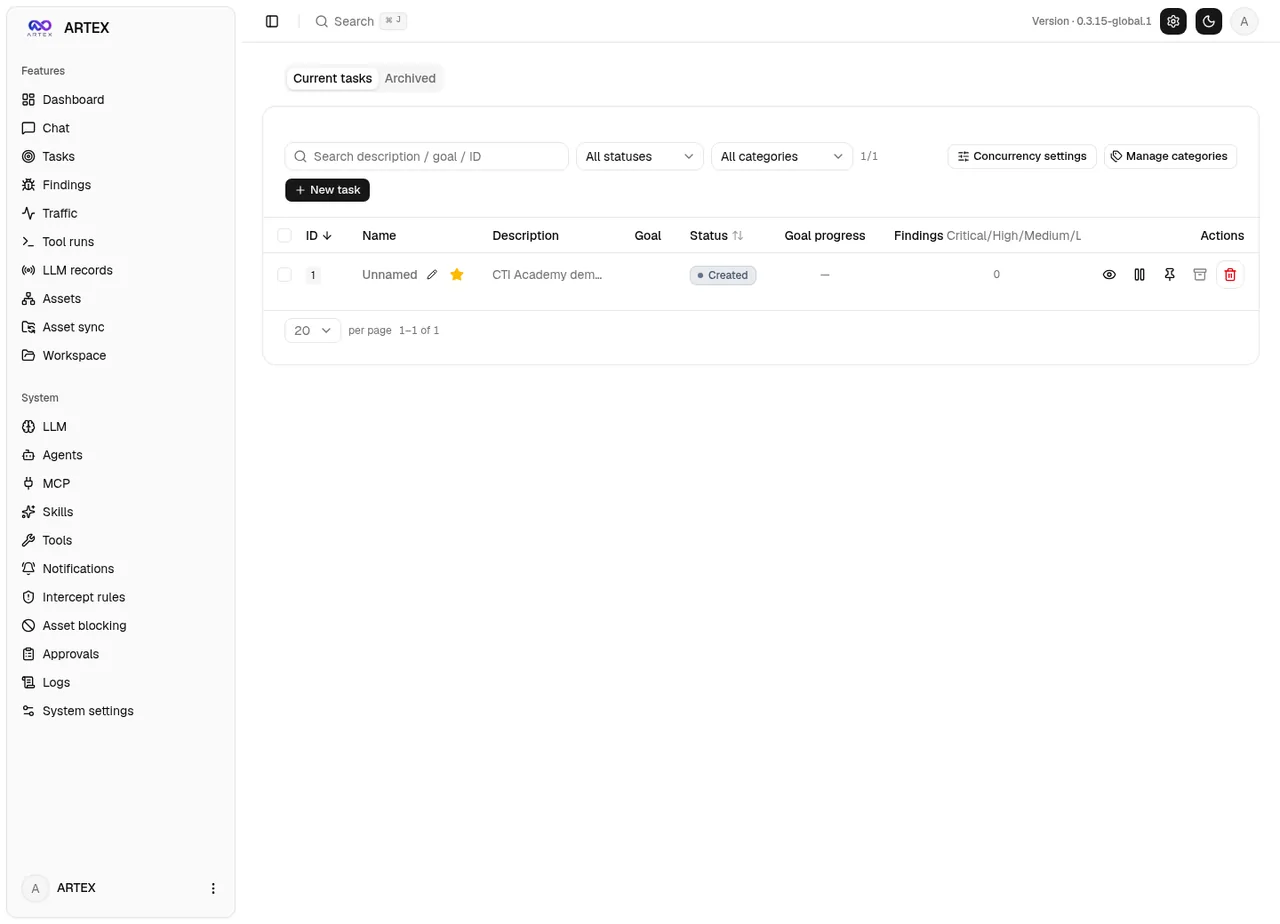
The ARTEX v0.3.15 dashboard. The System section of the sidebar holds the controls we audited: Intercept rules, Asset blocking and Approvals. Screenshot: CTI Academy lab.
How We Tested
We deployed the published release binary in a throwaway Kali VM:
- UI and API on
127.0.0.1:8787 - Recording proxy on
127.0.0.1:8788 - A user-local PostgreSQL
- No LLM configured, so the agent loop stays idle and nothing attacks anything
- No scan targets
We cloned the source at the exact release tag (v0.3.15-global.1, commit d6964594) and reviewed it boundary by boundary. Each candidate finding was then checked against the source and, where it was safe and local, against the running instance. The only "target" was a loopback marker service that returns the string ARTEX-LAB-MARKER-OK and nothing else.
Without an LLM we could not drive the agent loop itself. For the gate logic, we compiled a small Go harness against the pinned source and called ARTEX's own intercept and db decision functions directly. No agent, no network, no shell execution: just the real gate code answering "would this be allowed?"
Finding 1: The Scope Blacklist Does Not Gate Execution
Severity: High. ARTEX ships an Asset blocking control, a global blacklist of domains, IPs, URLs and CIDR ranges. The UI states its purpose plainly: "Matched domains / IPs / URLs / ranges are blocked and no task runs against them." Any operator would read that as "the agent will not touch these hosts."
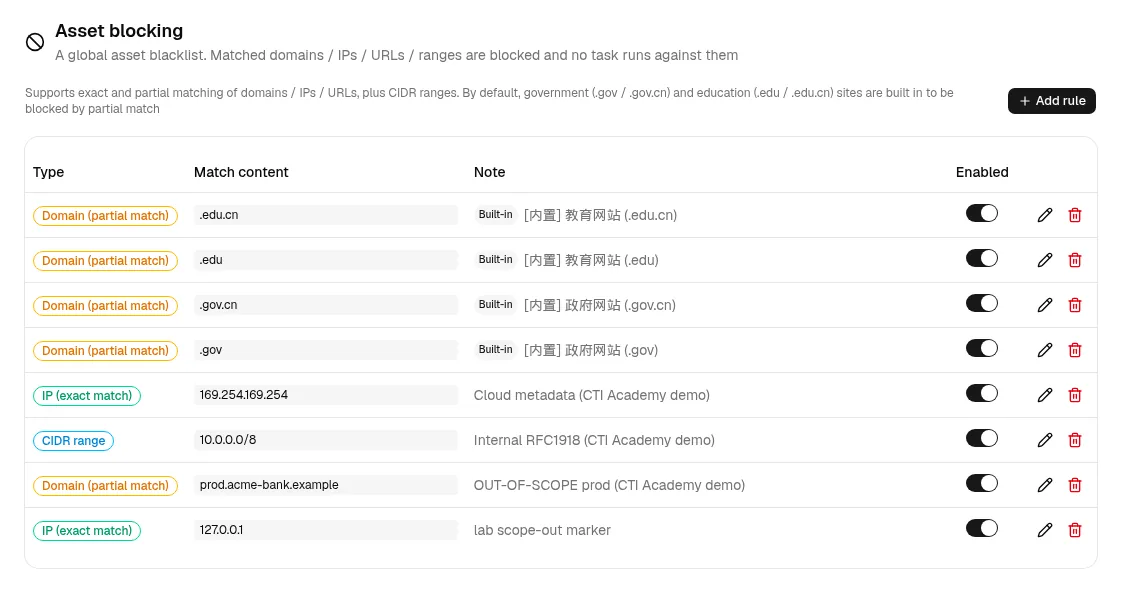
Asset blocking promises that "no task runs against them." We added demo rules for cloud metadata (169.254.169.254), internal RFC1918 space (10.0.0.0/8) and an out-of-scope production host.
In the code, the blacklist is consulted in exactly two places, insert_assets and add_intent. Both are knowledge-graph writes. No execution tool (Bash, WebFetch, custom command or HTTP tools, MCP tools) checks it before making a network call. The control is wired to the layer that remembers an asset, not the layer that sends packets to it.
We proved both halves. First, the matcher works when it is actually called. Our harness ran ARTEX's real EvaluateAssetGate against a lab database blocking 127.0.0.1:
EvaluateAssetGate(block 127.0.0.1 ; ip=127.0.0.1)
  => Allowed=false  reason="hit asset-intercept rule [IP(exact): 127.0.0.1]"
Then, with that same rule active in the live instance, we ran a custom command tool against the blocked host through the same runCommandTool path the agent uses:
# block rule is live
POST /api/asset-intercept/rules {"kind":"exact_ip","pattern":"127.0.0.1","enabled":true}
  -> {"id":5, "enabled":true}

# run a custom command tool at the BLOCKED host
POST /api/tools/custom/test {"kind":"command","exec":{"command":"curl -s {url}"},
                             "params":{"url":"http://127.0.0.1:9191/"}}
  -> {"is_error":false, "output":"ARTEX-LAB-MARKER-OK\n"}
Expected: blocked. Observed: the command reached the blacklisted host and returned the marker.
The same gap applies to the agent's HTTP fetch tool, which also has no SSRF guard and follows redirects. Untrusted content can therefore steer it toward internal services or cloud metadata, exactly the destinations the blacklist appears to protect.
- Boundary: untrusted content leads to an out-of-scope action
- Root cause: the gate sits at graph writes, not at execution
- Verdict: confirmed (harness and live instance)
Finding 2: Custom and MCP Tools Bypass the Approval Gate
Severity: High. The Command interception page is ARTEX's approve-or-deny engine: "before a tool runs, it is first checked against interception rules." It ships a strong-looking set of built-in Deny rules covering rm -rf, mkfs, dd, fork bombs, SQL DROP and TRUNCATE, MongoDB drops, Redis FLUSHALL and HTTP DELETE. Look at the scope line at the top, though.
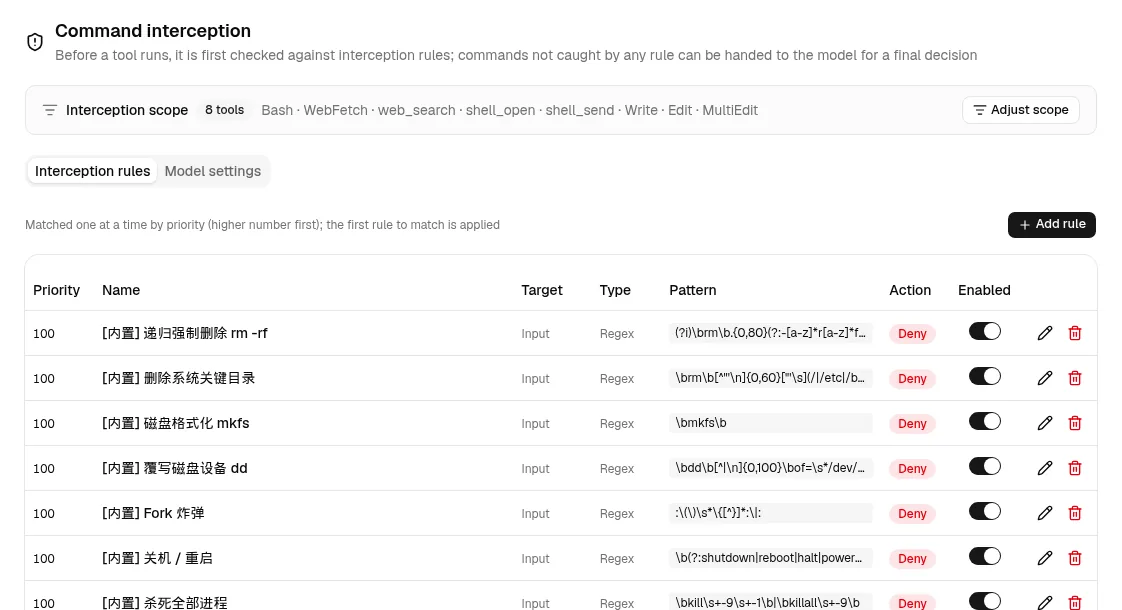
Command interception. Two details carry the whole finding: the interception scope covers exactly 8 tools, and every rule's Target is Input.
Two structural facts defeat the gate for the most important execution surfaces.
It is a name allowlist of 8 built-in tools. The scope is Bash, WebFetch, web_search, shell_open, shell_send, Write, Edit, MultiEdit. A custom command tool's name is not in that set, and neither is an MCP tool's server-prefixed name. The guard short-circuits to allow before any rule runs. Custom command tools also call the Bash core directly, so no second check fires further down.
Rules match the Input, meaning the tool's parameter JSON, not the rendered command. Even if an operator adds a custom tool to the scope, a rule written against a command string never sees the command.
We compared the identical harmless operation, an HTTP DELETE, on the built-in Bash tool and on a custom command tool named lab_del (template curl -X DELETE {url}), using ARTEX's real gate functions:
enabled-tools allowlist: [Bash WebFetch web_search shell_open shell_send Write Edit MultiEdit]
IsToolEnabled("Bash")    = true
IsToolEnabled("lab_del") = false

[built-in Bash]  Match("Bash", {"command":"curl -X DELETE http://.../orders/1"})
   => matched=true  action="deny"  rule="[builtin] curl/wget DELETE"   <- BLOCKED

[custom lab_del] Match("lab_del", {"url":"http://.../orders/1"})
   => matched=false action=""                                         <- NOT blocked
Same operation, same target, opposite verdicts. The only difference is which tool name carried the request.
- Boundary: a content-driven tool call runs without approval
- Root cause: the gate keys on the tool name and the parameter JSON
- Verdict: confirmed (harness, real intercept code)
Findings 1 and 2 share one root cause: enforcement is applied at the wrong layer, to the wrong subject. Graph writes, tool names and parameter JSON are all proxies for what actually matters, the resolved destination and the rendered command. One choke point in front of every tool that touches the network or a shell, acting on those resolved values, would close both.
Finding 3: An Open, Unauthenticated Proxy by Docker Default
Severity: High, conditional on a non-loopback deployment. ARTEX's traffic-recording proxy is a full HTTP and CONNECT forward proxy with no authentication and no destination allow or deny list. Whether that matters comes down to one setting, the bind address, and two independent controls that are easy to conflate:
- The shipped binary binds the proxy to
127.0.0.1:8788. Loopback only, so safe. - The shipped Docker image
CMDbinds:8788, which means0.0.0.0inside the container. - The
docker-compose.ymlpublishes127.0.0.1:8788:8788, which mitigates the issue for that compose file only. A plaindocker run -p 8788:8788or a Kubernetes mapping that does not copy the loopback publish exposes the proxy.
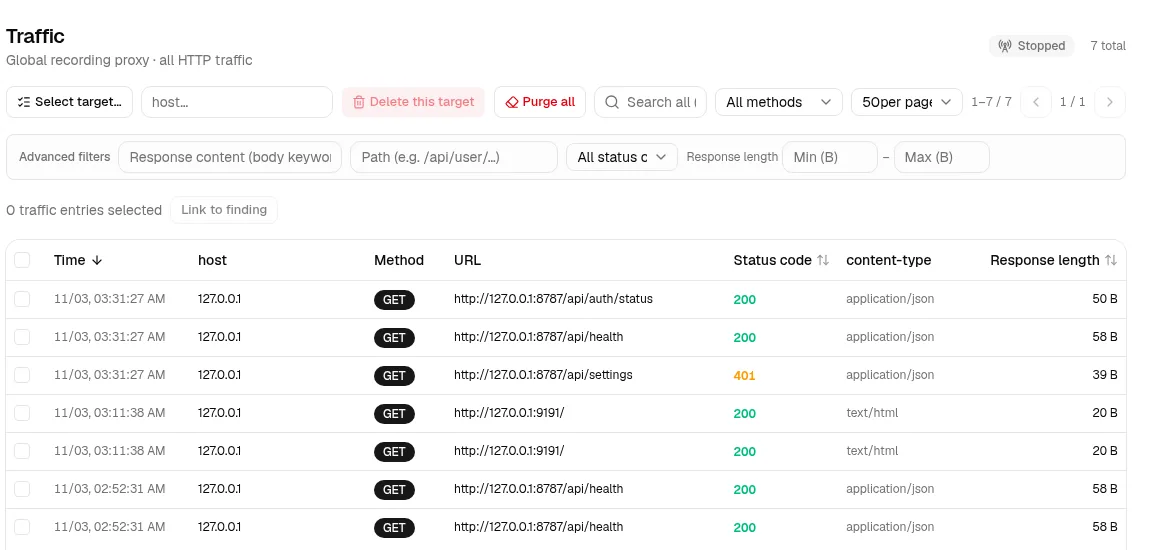
The Traffic view records every request that passes through the proxy. In our lab, every entry is a loopback request to the marker service or ARTEX's own API.
In the lab we modeled both cases. With the proxy bound to 0.0.0.0, as the image does by default, a client on another host with no credentials proxied straight through to our loopback marker:
# unauthenticated client -> 0.0.0.0-bound proxy -> lab service (loopback target only)
curl -x http://10.0.2.15:8789 http://127.0.0.1:9191/
  ARTEX-LAB-MARKER-OK   [HTTP 200, no 407, no auth]

# loopback-bound proxy (binary and compose default) is not reachable off-host
curl -x http://10.0.2.15:8788 http://127.0.0.1:9191/
  [connection refused]
| Deployment | Proxy bind | Reachable off-host | Auth |
|---|---|---|---|
| Binary or compose default | 127.0.0.1:8788 |
No | n/a |
| Docker image CMD | 0.0.0.0:8788 |
Yes | None |
When exposed, this is an unauthenticated SSRF, internal pivot and cloud metadata primitive. It is a network pivot, not a path into ARTEX's admin API, which stays behind authentication even when reached through the proxy.
There is a threat-hunting angle as well. Operators who run the image with a careless port mapping expose the same open proxy on their infrastructure. An unauthenticated CONNECT-capable listener on 8788 next to a web UI on 8787 is a fingerprint worth keeping in mind when you pivot on suspected attack servers. It is a lead to verify, not an indicator of compromise on its own. Our attack surface management guide covers how to turn exposure fingerprints like this into repeatable hunts.
Three More Findings Worth Knowing
A3: custom-tool argument injection (Medium). The custom-tool templating correctly single-quotes values, so shell metacharacter injection does not work. A value is still placed as its own argument, though. A value derived from untrusted content that starts with - reaches the target binary as a flag. Think of a template like nmap {target} receiving a target that is really an option. The impact is bounded, but it is a genuine boundary crossing, distinct from "the model followed instructions."
A4: the agent shell can read and exfiltrate host secrets (Medium, conditional). Verified: the agent's shell has no filesystem read sandbox. The SDK safety floor only blocks catastrophic commands like rm -rf /. The seeded rules block destructive commands and piped exfiltration, but not file reads or a non-piped upload of a file's contents. The database DSN and API keys sit on the same host and are readable through /proc/self/environ. Not verified: the prompt injection step that would trigger it, because we never drove the agent. The capability is confirmed; the end-to-end exploit is conditional.
S1: self-update has no code signature (Medium, conditional). Update integrity rests on an unauthenticated SHA256SUMS file shipped in the same release, with no signature and no key pinning. The transport is otherwise hardened: HTTPS, a host allowlist on redirects, zip-slip-safe extraction, an atomic swap and automatic rollback. The hardcoded update source currently returns 404, so it fails safe today, and we found no evidence that anyone else controls it. This is a latent supply chain risk: if that source is ever revived or compromised, one "Update now" click installs a trojaned binary that persists.
Can an Unauthenticated Attacker Break In?
Short answer: no direct path into ARTEX's admin API. We probed the pre-auth surface the way an external attacker would, and the auth layer held up well.
| Attack | Result |
|---|---|
| Protected routes without a token | 401 everywhere |
| Path normalization tricks | Clean 307, then 401 |
| HTTP verb tampering | 401; OPTIONS gives empty 204 |
| JWT forgery (alg none, guessed key) | 401 |
Claim admin via /api/auth/init |
403, password already set |
.env, .git, source maps |
SPA fallback HTML only |
The JWT signing key is derived from a server key and the password hash, so a password change revokes every earlier session. Constant-time comparisons and a per-peer login throttle that deliberately ignores X-Forwarded-For round it out. The realistic external foothold remains Finding 3, and only as a network pivot on exposed deployments, not as a takeover of ARTEX itself.
What This Means for Defenders
Autonomous AI attack frameworks are now part of the threat landscape, a shift we tracked in the 2026 cyber threat landscape. Tools like ARTEX are also how blue teams learn to study them. These takeaways reach well beyond one project:
- Scope and approval controls must live where the connection happens. If containment is enforced where a tool records an asset rather than where it connects, the guardrail is cosmetic. Test the control instead of trusting the label: add a rule, then try to reach the blocked host through every tool path.
- Name-based allowlists rot. A gate that lists 8 built-in tool names silently excludes every custom and MCP tool added later. Gate on capability instead: anything that shells out or opens a socket. This is the pattern OWASP calls excessive agency.
- Hunt the open proxy. An unauthenticated forward proxy on
0.0.0.0is a classic SSRF and pivot primitive. Watch for CONNECT-capable listeners that never send aProxy-Authorizationchallenge, and for egress to169.254.169.254or RFC1918 ranges from any host running offensive tooling. MITRE tracks the technique as Proxy (T1090). - Treat unsigned self-update as a persistence vector. Any updater whose integrity rests on an unauthenticated checksum is one compromised release away from delivering malware. Pin and verify a signature, and alert on update callouts to unexpected sources.
- Sandbox the agent's shell. If an agent reads attacker-controlled content and has an unconfined shell on the host holding its own secrets, prompt injection becomes credential theft. Isolate the shell from the install directory, the environment and
/proc/self/environ.
A pattern runs through all five: an AI agent will pick whatever path its tools allow, so every control has to sit on the path itself, not next to it. The same logic shows up in Anthropic's report on the first AI-orchestrated espionage campaign, where the human operators intervened only at a few decision gates.
Responsible Disclosure and Lab Hygiene
This research ran against our own isolated deployment for defensive and educational purposes. We used harmless marker services and fabricated data; no external host was contacted and no real secret was used. The findings concern insecure defaults and control placement, not a remotely triggerable compromise of ARTEX itself, and we kept the evidence at the level needed to verify a fix.
The upstream repository is private and no longer maintained, so the Global Edition fork is the right place for fixes. After capturing evidence, we tore down the short-lived non-loopback instance so no open proxy was left running.
Scope reminder: running a framework like ARTEX against systems you do not own, or lack written authorization to test, is likely a crime regardless of the tool's defaults. Keep it in the lab.
From Reading Findings to Making the Call
Reading an audit like this is the easy part. The hard part is the analyst work behind it: deciding which reports about a public tool tell you something about an actor and which only describe the tool, then turning an exposure fingerprint into a hunt you can defend. That judgment comes from practice on real cases, which is what our Cyber Threat Intelligence learning path is built around. For the foundations, start with what cyber threat intelligence is.
Frequently Asked Questions
What is the ARTEX AI pentest framework?
ARTEX is an open-source autonomous penetration testing system driven by LLM multi-agents. A planner agent breaks a goal into steps, worker agents run real security tools through a recording proxy, and results build up in a graph of assets and findings. It ships as a Go binary with an embedded web UI and a PostgreSQL backend. The original repository went private in October 2026, and a Global Edition fork remains public.
Who has used ARTEX in real attacks?
In October 2026, CrowdStrike tied ARTEX to an unknown actor targeting South Korean finance, and Microsoft said the China state-aligned group Storm-0940 used it after the ConnectWise supply chain compromise. TrendAI reported ARTEX in attacks on Japanese companies, and Korean police linked it to a domestic extortion group. Because the tool is public, its use alone does not identify the operator.
Does the ARTEX scope blacklist stop the agent from reaching blocked hosts?
Not in the version we audited (v0.3.15-global.1). The Asset blocking list is only checked when the agent writes assets or intents to its knowledge graph. Execution tools such as Bash, WebFetch, custom tools and MCP tools never consult it, so in our lab a custom tool reached a blacklisted host and returned the marker.
Why do custom and MCP tools bypass the ARTEX approval gate?
The Command interception gate only applies to a fixed list of 8 built-in tool names, so custom and MCP tools are allowed before any rule runs. Rules also match the tool's parameter JSON rather than the rendered command, so a rule written for a command string never sees what a custom tool actually executes.
Is the ARTEX proxy exposed to the network by default?
It depends on how ARTEX is deployed. The binary binds its recording proxy to 127.0.0.1:8788, and the shipped docker-compose file publishes it on loopback only. The Docker image itself binds 0.0.0.0:8788, so a plain docker run port mapping or a Kubernetes service can expose an unauthenticated forward proxy.
Can an unauthenticated attacker take over an ARTEX instance?
We found no direct path. Protected routes return 401 without a token, path tricks and verb tampering fail, forged JWTs are rejected, and the setup endpoint refuses once a password exists. The realistic external risk is the open proxy on exposed Docker deployments, which works as a network pivot rather than access to the admin API.
How can defenders detect autonomous AI pentest frameworks like ARTEX?
Look for the behavior and the infrastructure rather than the brand. Useful signals include bursts of tool-driven reconnaissance followed by fast privilege escalation, unauthenticated CONNECT-capable proxies on attack servers, and egress to cloud metadata or RFC1918 ranges from tooling hosts. Pair those signals with vendor reporting on specific campaigns before attributing activity to any actor.
Sources
- CrowdStrike: Unknown Threat Actor Uses AI-Driven ARTEX to Target South Korean Finance
- Microsoft Security Blog: Storm-0940, ARTEX and the ConnectWise supply chain compromise (21 October 2026)
- The Record: Microsoft blames ConnectWise attacks on Chinese state hacker using ARTEX AI agents
- Cloud Security Alliance: Multi-Agent Offensive Frameworks in the Wild: CyberStrikeAI and ARTEX
- TrendAI: Not Only ARTEX: The Different Levels AI Is Used in Attacks Targeting Japan
- Digital Today: ARTEX open-source AI penetration testing tool goes private
- GitHub: ARTEX Global Edition
- OWASP GenAI: LLM06:2025 Excessive Agency
- Anthropic: Disrupting the first reported AI-orchestrated cyber espionage campaign
- MITRE ATT&CK: T1090 Proxy