
In one week of June 2024, police in 27 countries took 593 servers running cracked Cobalt Strike offline. Red team tooling gets abused, and that is the reason defenders should read the manuals before the attackers do.
BEAR-C2 is one of the newer manuals worth reading. It is a free, open-source command and control (C2) framework built for adversary emulation: it lets a red team copy the network habits of named APT groups such as APT29 (Cozy Bear), Lazarus and Mustang Panda inside a lab. You get DNS over HTTPS (DoH), HTTPS, HTTP, QUIC and reverse TCP listeners, a separate cipher per listener, domain generation (DGA), TLS fingerprint spoofing, and C2 that runs over Discord or Telegram, all in one desktop GUI.
We installed BEAR-C2 in an isolated Kali Linux lab and went through every screen. This post covers what the framework is, how its pieces fit together, and what each screen tells a defender to hunt for. The second half is a detection guide, an ATT&CK mapping and a comparison with Cobalt Strike, Sliver and Mythic.
Scope and honesty note. All screenshots come from our own isolated lab. We did not run a beacon against a real host, we did not reverse the generated payloads, and we have not validated the hunting ideas below against live BEAR-C2 traffic. Treat them as hypotheses built from the tool's own settings. BEAR-C2 is published for education and authorized testing only, and this post does not include setup or operating instructions.
What Is BEAR-C2?
BEAR-C2 is an adversary emulation and C2 framework written in Python by the researcher who publishes as S3N4T0R-0X0. Its desktop interface is built with customtkinter, and the whole operator console is packed into a single executable with PyInstaller. In our build that file came to about 134 MB. The operator side runs on Linux; the payloads it builds target Windows.
The project grew out of the same author's APTs Adversary Simulation collection, which rebuilds published attack chains of state-linked groups from Russia, China, Iran and North Korea. The repository describes BEAR-C2 as a set of C2 scripts, payloads and stagers for simulated attacks modeled on those groups, with AES, XOR, DES, TLS, RC4, RSA and ChaCha encryption between payload and operator.
The name is a nod to industry naming. "Bear" is the suffix CrowdStrike gives to Russia-linked actors, just as "Panda" marks China, "Chollima" North Korea and "Kitten" Iran. If those animal names are new to you, our guide to how threat actors get their names explains the system. The groups BEAR-C2 references include:
| Origin | Groups |
|---|---|
| Russia | Cozy Bear (APT29), Fancy Bear (APT28), Voodoo Bear, Energetic Bear, Berserk Bear |
| China | Mustang Panda, Wicked Panda, Goblin Panda, Deep Panda |
| North Korea | Lazarus, Labyrinth Chollima, Velvet Chollima, Famous Chollima |
| Iran | Helix Kitten, Charming Kitten |
One thing to be clear about: BEAR-C2 does not contain those groups' malware. It lets an operator dress traffic up with the protocol, cipher, timing and infrastructure choices public reporting attributes to them. That is a costume, not a copy.
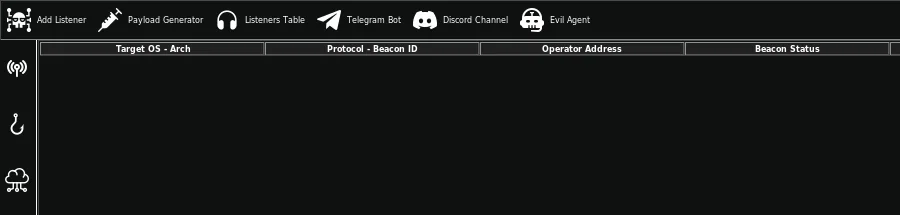
Figure 1: The BEAR-C2 main console in our lab. The toolbar holds the core modules (Add Listener, Payload Generator, Listeners Table, Telegram Bot, Discord Channel, Evil Agent); below it sits the session table where each live beacon appears. The crop shows its first four columns; the full table also lists hostname, check-in time, process ID and target IP, and an "Ops-Shell" prompt at the bottom of the window takes operator commands. Capture: CTI Academy lab.
Adversary Emulation vs Adversary Simulation
The two terms get swapped all the time, and BEAR-C2's author separates them, so it helps to pin them down.
Adversary simulation asks a general question: could an attacker get from the internet to our crown jewels? Adversary emulation asks a narrower and more useful one: if this specific group came for us with the tradecraft it is known to use, would we see it? Emulation starts from threat intelligence. You pick the actors your sector actually faces, pull their TTPs from reporting and MITRE ATT&CK, and replay them as closely as you can.
That is where a framework like BEAR-C2 earns its place. If your intelligence says an APT29-style intrusion would hide C2 in DoH with AES, and a Lazarus-style one would use HTTPS with ChaCha20, you can stand both up side by side and test whether your network sensors can tell either one from normal traffic. If you need a refresher on what a C2 channel is in the first place, start with our explainer on malware command and control.
How BEAR-C2 Works: Listener, Beacon, Channel
Everything in BEAR-C2 hangs off one object: the listener. The flow has four parts.
- Operator console. The GUI where listeners are defined, payloads are built and sessions are handled.
- Listener. A server-side endpoint with a protocol (DoH, HTTPS, HTTP, QUIC or reverse TCP), a cipher (AES, XOR, RC4, DES, ChaCha20, RSA or none), beacon timing and OPSEC options.
- Beacon. The implant on the target, built as EXE, DLL, BIN or HEX output, with settings that must match its listener exactly.
- Side channels. Discord or Telegram as an alternative C2 path, plus exfiltration profiles for Google Drive, OneDrive and Dropbox.
When a listener starts, BEAR-C2 generates a Beacon Authentication ID, a UUID such as a90469df-d71b-4885-a963-57dc8661fb13. Only beacons that present that ID are accepted. The point is to stop researchers and internet scanners from fingerprinting the server by sending it a fake check-in, which is exactly how many Cobalt Strike team servers have been found over the years. For a hunter, it means active probing of a suspected BEAR-C2 server is unlikely to work; passive network evidence matters more.
The design goal is speed. Writing a new C2 script for every mix of protocol, cipher and exfiltration target is slow and error-prone. BEAR-C2 turns each mix into a form you fill in.
Inside the Listener: What the Form Tells a Defender
The Add Listener window is the most useful screen in the tool for a blue team, because it lists every knob an operator can turn to make C2 traffic look normal. Each knob is a hint about where your detection could fail.
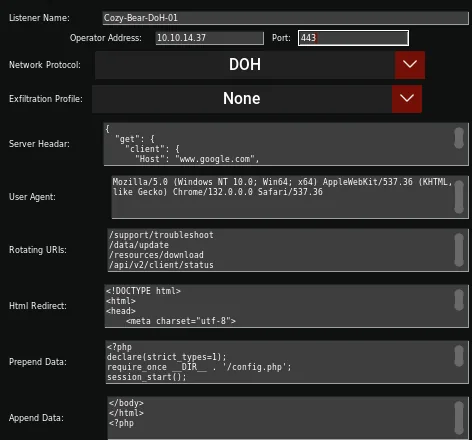
Figure 2: The left side of the Add Listener form for a DoH listener we named Cozy-Bear-DoH-01. The operator sets a host header pointing at www.google.com, a Chrome on Windows user agent, a list of rotating URIs, an HTML page for redirects, and data that is prepended and appended to each message so the payload sits inside text that looks like PHP or HTML. Capture: CTI Academy lab.
The traffic profile fields are about blending in at the HTTP layer. Notice what was in the form in our build: a Chrome/132.0.0.0 user agent on Windows 10, and URIs like /support/troubleshoot, /data/update, /resources/download and /api/v2/client/status. Chrome 132 shipped in January 2025. Real Chrome updates itself, so by late 2026 a "browser" still announcing version 132 from a managed endpoint is a small anomaly worth a query.
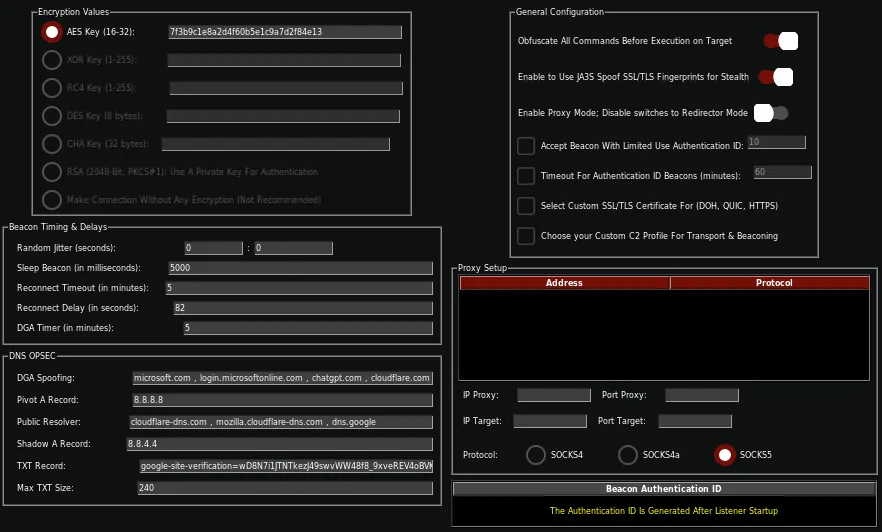
Figure 3: The middle and right panels of the same form. Encryption is chosen per listener (AES here). Beacon timing covers sleep, jitter, reconnect and a DGA timer. The DNS OPSEC block lists the domains used for DGA spoofing, the public DoH resolvers, pivot and shadow A records and a TXT record template. The right panel holds JA3S spoofing, command obfuscation, proxy mode, a custom certificate option and the Beacon Authentication ID. Capture: CTI Academy lab.
Read that DNS OPSEC panel slowly, because it is a list of what the operator wants your logs to contain:
- DGA spoofing domains:
microsoft.com,login.microsoftonline.com,chatgpt.com,cloudflare.com. These are names no one blocks, picked so that lookups near the C2 traffic look routine. - Public resolvers:
cloudflare-dns.com,mozilla.cloudflare-dns.com,dns.google. These are the DoH endpoints the beacon would talk to. - Pivot and shadow A records:
8.8.8.8and8.8.4.4, well-known addresses used as decoys. - TXT template: a
google-site-verification=string, which is the most common TXT record on the internet and the perfect place to hide a payload. - Timing: a 5,000 ms sleep with jitter set to 0 in our lab form. With no jitter, a beacon checks in exactly every five seconds, which is the easiest pattern a beacon detector can find.
Key idea: the form shows that BEAR-C2's stealth depends on traffic that looks like something you already allow. Your detection therefore has to work on behavior (which process, how often, how much, to which resolver) rather than on destinations.
We cannot tell from the GUI alone which of these values are hard-coded defaults and which the form keeps from a previous session. Treat them as low-cost, short-lived hunting leads, not as signatures.
The Listeners Table: Many Personas at Once
A real emulation exercise rarely runs a single channel. The Listeners Table shows every listener, its address, protocol, cipher, exfiltration profile and state, and lets the operator start, stop or delete them.

Figure 4: Three listeners running at once in our lab, each named after the group it imitates: Cozy-Bear-DoH-01 (DoH, AES), Lazarus-HTTPS-01 (HTTPS, ChaCha20) and APT28-RevTCP-01 (reverse TCP, RC4). The exfiltration profile column is cropped out; it read "None" for all three. Capture: CTI Academy lab.
This is the part that makes BEAR-C2 useful for purple teams. You can run three personas against the same segment and see which ones your sensors catch, which ones they half-catch and which ones disappear. A reverse TCP channel on port 4444 should light up any decent egress monitoring; a DoH channel to dns.google is a much harder test.
Payload Generator: How Beacons Get Built
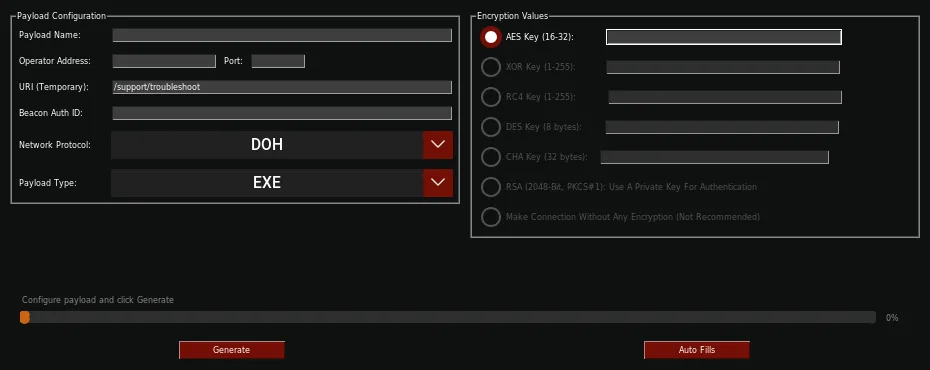
Figure 5: The Payload Generator. The operator picks a protocol, an output type (EXE, DLL, BIN or HEX) and a cipher; the "Auto Fills" button copies address, port, URI, key and the Beacon Authentication ID from an existing listener so the beacon and listener match. Capture: CTI Academy lab.
We did not generate or analyze payloads for this post, but the build process tells you what to expect on disk. BEAR-C2's build script installs the Rust toolchain with the x86_64-pc-windows-gnu target, the MinGW-w64 cross compiler, and the donut-shellcode library. That combination points to Windows PE files compiled on Linux, plus BIN and HEX outputs that are most likely position-independent shellcode made from those PEs. For defenders that means three things to cover:
- Unsigned Rust or MinGW-compiled binaries appearing in user-writable folders, with names chosen to look like system files.
- In-memory loaders: shellcode that never touches disk as a PE, which is where EDR memory scanning and ETW telemetry matter more than file hashes.
- DLL outputs, which suggest side-loading next to a legitimate executable.
Evil Agent: Discord and Telegram as C2
The most modern idea in BEAR-C2 is the Evil Agent module. Instead of talking to a server the operator owns, the agent talks to a Discord channel or a Telegram bot. There is no attacker IP to block and no new domain to flag.
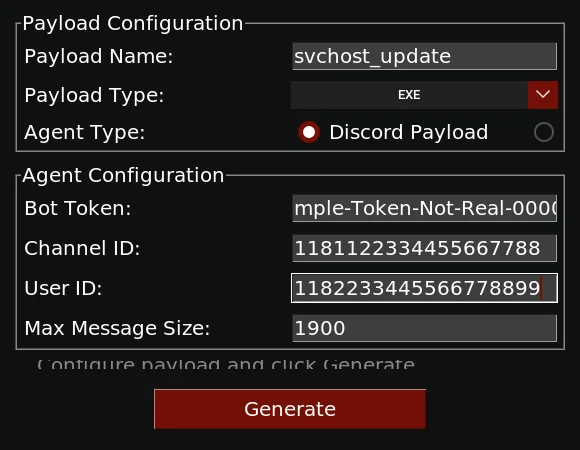
Figure 6: Evil Agent configured for Discord in our lab. The fields are a bot token, a channel ID, a user ID and a maximum message size of 1,900 characters, just under Discord's 2,000-character message limit. We named the payload svchost_update, the kind of system-sounding name real operators pick. The token and IDs shown are fake. Capture: CTI Academy lab.
This is not a lab curiosity. AhnLab's ASEC documented UNC5174 using a Discord bot as its backdoor's C2 channel instead of building its own infrastructure, and The Hacker News reported on ChaosBot, a Rust backdoor controlled through Discord. On the Telegram side, Cofense found that 3.8 percent of its malware threat reports from early 2024 to mid 2025 used Telegram as a C2 channel. We cover the wider criminal use of the platform in our piece on Telegram as a cybercrime marketplace.
The defender's problem is simple to state: discord.com and api.telegram.org are allowed in most networks. The answer is to look at who is talking to them. A browser or the Discord desktop app is normal. A process named svchost_update.exe, a PowerShell session, or any server polling the Bot API on a fixed timer is not.
Phishing and File Hosting Modules
BEAR-C2 also ships two small web servers: one for credential phishing exercises and one for hosting files.
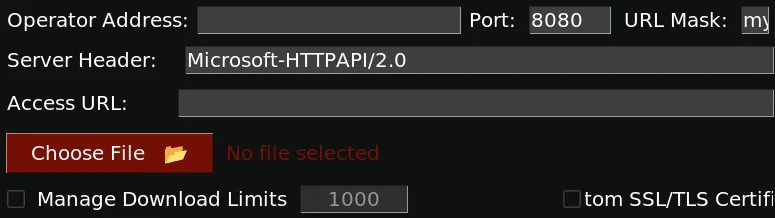
Figure 7: The Host File module serves a file from the operator's machine with a configurable port, URL mask and download limit. The server header is set to Microsoft-HTTPAPI/2.0. Capture: CTI Academy lab.
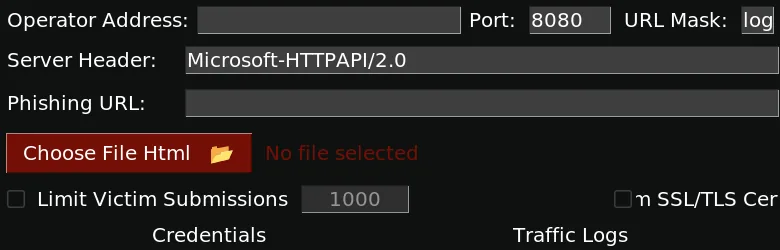
Figure 8: The Spear Phishing module hosts an HTML page, caps the number of submissions and shows captured credentials and traffic logs side by side, which is what an authorized awareness exercise needs to measure click and submission rates. Capture: CTI Academy lab.
Both modules default to the server header Microsoft-HTTPAPI/2.0. That header normally comes from HTTP.sys on Windows. A server that claims to be HTTP.sys while its TCP stack, TLS behavior or open ports say Linux is a mismatch you can hunt on in internet scan data. We used the same "trust the mechanics, not the banner" logic in hunting without traditional C2 indicators, where real HTTP.sys listeners were the problem.
Other Modules
The remaining tools cover the side jobs of an operation:
- Script Obfuscator for PS1, BAT, HTML, VBS, JS and PY files: renaming, string encryption, junk code, layered obfuscation and anti-debug checks.
- Exfiltration profiles that send collected data to Google Drive, OneDrive or Dropbox using API tokens, per session.
- Proxy and redirector mode over SOCKS4, SOCKS4a or SOCKS5, so the real server sits behind a relay.
- Notes, a scratch pad for the operator.
None of these are new techniques. What is new is having all of them in one free GUI, which lowers the skill needed to run a convincing multi-channel exercise, for red teams and for anyone else who downloads it.
How to Detect BEAR-C2 and Tools Like It
You will not find a stable "BEAR-C2 signature," and you should not want one. Operators can change every string in the forms above. What they cannot easily change is the behavior: a process on a host talking to an outside service on a schedule, moving data in one direction. Detect that and you cover BEAR-C2, its successors and the real groups it imitates.
| Technique | Where to look | What stands out |
|---|---|---|
| DoH C2 | Proxy, DNS, EDR network | Non-browser process to a DoH resolver |
| Beaconing | Zeek conn logs | Regular intervals, similar sizes |
| TLS spoofing | JA4 / JA4S, certificates | Fingerprint does not match claimed client |
| DGA | DNS logs | High-entropy names, NXDOMAIN spikes |
| Discord / Telegram C2 | Proxy, EDR | Odd process to discord.com or api.telegram.org |
| Cloud exfiltration | CASB, proxy | Unapproved Drive, OneDrive, Dropbox API uploads |
| Obfuscated scripts | PowerShell 4104, AMSI | Encoded strings, junk code, entropy |
| Fake HTTP.sys banner | Internet scan data | Microsoft-HTTPAPI/2.0 on a Linux stack |
DoH. Decide which DoH resolvers are allowed and make the endpoints use them. Then flag any process other than a browser or your managed DNS client sending HTTPS to cloudflare-dns.com, dns.google or other public resolvers. DoH from rundll32.exe is not a privacy feature. Stairwell's research on ChamelGang's ChamelDoH implant shows why: the resolvers are too widely used to block outright, so process context is what separates good from bad. (NEC's later analysis argues ChamelDoH's beacons are closer to classic DNS tunneling than true DoH, a reminder to check what a "DoH" label means in each report.)
Beaconing. Jitter makes intervals noisier, not random. Tools like RITA from Active Countermeasures score Zeek connection logs for regular timing and consistent sizes, and a zero-jitter five-second beacon like the one in our lab form would score near the top. Black Hills Information Security has a good walkthrough of detecting beacons with Zeek and RITA.
TLS fingerprints. BEAR-C2 offers JA3S spoofing, and JA3 itself has aged badly since Chrome started randomizing TLS extension order. Move to the JA4+ suite from FoxIO, which sorts extensions before hashing, and look for disagreements: a ClientHello that claims to be Chrome from a process that is not Chrome, or a server fingerprint that does not fit the certificate and banner it shows.
DGA. Look for bursts of long, random-looking names and unusual NXDOMAIN rates from a single host, and remember that the spoofed domains in Figure 3 are there to dilute exactly that signal.
Discord, Telegram and cloud storage. Baseline which users and processes legitimately use these services. On servers and kiosk machines, there is usually no business reason at all. Where there is, alert on scripting engines and unsigned binaries calling the APIs.
Scripts and loaders. Turn on PowerShell Script Block Logging (event 4104) and keep AMSI enabled. Obfuscation that defeats a static signature usually produces text that looks nothing like an admin script, and that is detectable in its own right. For a broader view of tradecraft that hides inside allowed tools, see our post on living off the land attacks.
MITRE ATT&CK Mapping for BEAR-C2
Mapping a tool to ATT&CK lets you check coverage technique by technique instead of tool by tool.
| BEAR-C2 feature | ATT&CK technique | ID |
|---|---|---|
| HTTP / HTTPS listener | Web Protocols | T1071.001 |
| DoH listener | DNS | T1071.004 |
| DoH / QUIC tunneling | Protocol Tunneling | T1572 |
| AES, RC4, DES, ChaCha20 | Symmetric Cryptography | T1573.001 |
| RSA | Asymmetric Cryptography | T1573.002 |
| DGA | Domain Generation Algorithms | T1568.002 |
| Telegram / Discord agent | Bidirectional Communication | T1102.002 |
| Header and URI disguise | Protocol Impersonation | T1001.003 |
| Drive / OneDrive / Dropbox | Exfiltration to Cloud Storage | T1567.002 |
| SOCKS proxy, redirector | Proxy | T1090 |
| Script Obfuscator | Obfuscated Files or Information | T1027 |
| System-sounding payload names | Match Legitimate Name | T1036.005 |
| Spear Phishing module | Spearphishing Link | T1566.002 |
| Host File module | Ingress Tool Transfer | T1105 |
BEAR-C2 vs Cobalt Strike, Sliver and Mythic
People searching for BEAR-C2 usually want to know how it compares with the frameworks they already know. Here is the short version.
| Framework | License | Language | Best known for |
|---|---|---|---|
| BEAR-C2 | Open source, free | Python GUI | APT-themed listeners, Discord/Telegram C2 |
| Cobalt Strike | Commercial (Fortra) | Java | Mature beacon, Malleable C2 |
| Sliver | Open source (Bishop Fox) | Go | Cross-platform implants, mTLS/WireGuard |
| Mythic | Open source (SpecterOps) | Go, Python | Modular agents, web UI |
Cobalt Strike, Sliver and Mythic are mature, documented and widely used by both red teams and criminals. BEAR-C2 is a single-author project with a narrower purpose: making APT-flavored traffic quick to stage. It is a good tool for testing whether your sensors can see specific C2 styles. It is not something you would base a long engagement on, and you should expect rough edges.
Is It Safe to Run BEAR-C2 in a Lab?
It is legal to download and study an open-source tool, and illegal to use it against systems you do not own or are not authorized to test. If you want to look at it yourself, treat it like any offensive tool: an isolated VM with no route to production, no real Discord or Telegram tokens, no real cloud storage credentials, and endpoint protection on any Windows test host, because generated payloads may be flagged as malware, which is exactly what they are designed to be.
The operator console also needs a desktop session (it is a GUI, not a headless server), so plan for a VM with a display rather than a cloud box.
Turning This Into Detection Practice
Reading a tool's settings teaches you what to look for. Finding it in a day of noisy network logs, among backup jobs, update agents and chatty SaaS clients that also beacon, is a different skill, and it only comes from doing it. Our Threat Hunting Fundamentals learning path walks through forming a hypothesis from intelligence like this post and testing it against real telemetry.
Frequently Asked Questions
What is BEAR-C2?
BEAR-C2 is a free, open-source command and control framework for adversary emulation. It lets red teams copy the C2 habits of named APT groups, with DoH, HTTPS, HTTP, QUIC and reverse TCP listeners, per-listener encryption, DGA, TLS fingerprint spoofing and Discord or Telegram C2, all from a Python desktop GUI.
Who created BEAR-C2?
BEAR-C2 is published on GitHub by the researcher S3N4T0R-0X0, who also maintains the APTs Adversary Simulation collection that rebuilds attack chains of Russian, Chinese, Iranian and North Korean groups.
Is BEAR-C2 legal to use?
The code is public and studying it is legal. Using it against any system you do not own or have written permission to test is illegal, and the author publishes it for education and authorized testing only.
How is BEAR-C2 different from Cobalt Strike?
Cobalt Strike is a mature commercial red team platform owned by Fortra. BEAR-C2 is a free single-author project focused on staging APT-themed C2 quickly, with built-in options such as DoH listeners and Discord or Telegram agents. Cobalt Strike is far more complete; BEAR-C2 is narrower and easier to try.
What operating systems does BEAR-C2 support?
The operator console runs on Linux with a desktop environment. The payloads it builds target Windows and are compiled with the Rust toolchain and MinGW-w64.
How can I detect BEAR-C2 traffic?
Focus on behavior rather than strings. Watch for non-browser processes using public DoH resolvers, regular beacon timing in Zeek logs, mismatched JA4 fingerprints, DGA-style lookups, unexpected processes calling Discord or Telegram APIs, and unapproved uploads to cloud storage.
What is the difference between adversary emulation and adversary simulation?
Adversary simulation tests whether any attacker could reach a goal in your environment. Adversary emulation replays the known tactics, techniques and procedures of a specific threat group, chosen from threat intelligence, to check whether you would detect that group in particular.
Sources
- BEAR-C2 on GitHub (S3N4T0R-0X0)
- APTs Adversary Simulation on GitHub (S3N4T0R-0X0)
- Europol: Global action against criminal abuse of Cobalt Strike
- AhnLab ASEC: UNC5174 group's Discord bot backdoor malware
- The Hacker News: Rust-based ChaosBot uses Discord for C2
- Cofense: Weaponizing Telegram bots
- Stairwell: ChamelGang and ChamelDoH (PDF)
- NEC Security Blog: ChamelDoH analysis
- Active Countermeasures: RITA on GitHub
- Black Hills Information Security: Detecting malware beacons with Zeek and RITA
- FoxIO: JA4+ network fingerprinting on GitHub
- MITRE ATT&CK: Application Layer Protocol, DNS (T1071.004)
- MITRE ATT&CK: Web Service, Bidirectional Communication (T1102.002)