
Two government organizations, one in Kazakhstan and one in Romania, had a Russian espionage toolset on their Exchange servers for weeks. In the Romanian case it was set up to keep copies of email to and from NATO and EU addresses. When ESET published its analysis on 10 November 2026, the section on network infrastructure was a single short paragraph. No attacker-controlled server was found, and the ingress IP addresses could not be identified.
Think about what that does to a standard detection stack. Your blocklists, your threat feed, your DNS sinkhole and your "new domain contacted by a server" rule all wait for the malware to call home. This malware does not call out. The operators come to it, through the same HTTPS port your users use for Outlook on the web.
This post is about hunting when C2 indicators do not exist in the form you are used to: no beacon, no domain, no rare IP. We use ESET's research on Turla's Cereal toolset as the starting case, set it next to five other operations that avoid a classic beaconing server, and then lay out seven hunting hypotheses that come from the mechanics, not from a hash list.
What this post is, and is not. The discovery and analysis of Cereal belong to ESET Research; we summarize it in our own words and link to the original throughout. We did not handle samples and we did not run these hunts in a lab. Every hypothesis below is marked as untested, grounded in vendor reporting and Microsoft documentation, and written so your team can test it on its own systems.
Why C2 Indicators Stop Working
Most C2 detection rests on one assumption: an implant inside your network has to reach out. It sends a heartbeat, looks up a domain, or pulls tasking from a server the operator rents. That outbound habit is what makes domains, IP addresses, JA3/JA4 fingerprints and beacon timing useful. If you want the full picture of how that classic model works, our explainer on malware command and control covers it.
Passive implants flip the direction. The implant sits on a server that already accepts connections from the internet (a mail server, a web server, a VPN appliance) and waits for a request that only the operator knows how to build. Nothing leaves the victim network until the operator asks.
Three things break at once:
- There is no outbound rendezvous to block. No beacon domain to sinkhole, no C2 server address to add to a firewall rule. The control point is your own public hostname. The operators' source addresses and request features still exist as evidence; they just arrive inbound, mixed with your users' traffic, and someone has to look for them.
- Inbound traffic looks like normal traffic. The operator's requests use the same port, protocol and often the same URL shapes as real users.
- Sharing slows down. A threat intelligence report usually travels with network indicators that every subscriber can match in minutes. Here the most useful indicators are host artifacts, which take an endpoint agent or a forensic sweep to check.
That is why this kind of operation matters for CTI teams, not just for the SOC. If your intelligence requirements assume that espionage on your mail servers will show up as outbound C2, you are collecting in the wrong place. Our guide to cyber threat intelligence explains how requirements drive collection; this is a case where they need to change.
What ESET Found in Turla's Cereal Toolset
Here is a short version of ESET's findings, in our words. Read the WeLiveSecurity article and the white paper for the full analysis.
Victims and timing. ESET found the toolset at a Kazakh government organization on 28 November 2025. After tuning its detections, it found the same toolset at a Romanian government organization that had been compromised since at least 23 December 2025. ESET attributes the activity to Turla with high confidence. The main reason it gives is that a component already publicly tied to Turla was used alongside the new tools.
A passive backdoor on Exchange. The component ESET calls CerealNeuron uses the .NET HttpListener class to accept HTTPS requests on five URL prefixes that look like Exchange paths, for example https://*:443/owa/sdds/ and https://*:443/AUTODISCOVER/PROXYSERVICE/. A valid request is encrypted and integrity-checked. An invalid one gets redirected to an error page, which is what an operator probing a clean server would expect to see.
Commands as throwaway programs. Instead of one large backdoor with a fixed command set, the operators send each task as a small compiled .NET assembly that runs in memory. ESET lists tasks such as pulling mailboxes through Exchange Web Services (EWS), querying Active Directory over LDAP, running WMI queries and reading LSA secrets.
Collection inside the mail flow. The component ESET calls CerealBox is built to run inside EdgeTransport.exe, the Exchange process that moves mail. ESET could not tie the observed injections to process names (the operators targeted process IDs), so it inferred that target from how the payload works. It does not register a new transport agent. Instead, it wraps the routing agents that are already loaded, so no new agent appears in the Exchange configuration. It keeps messages with .doc, .docx or .pdf attachments that match target lists, compresses and encrypts them, and stages them in a file on disk.
Loading tricks. The loader, which is the only Cereal component written to disk as a readable .NET file, gets loaded by legitimate processes. ESET saw it as ncobjapi.dll and wbemcomn.dll in C:\Windows\System32\wbem\, where the WMI provider host loads it. It also showed up as a planted file in the .NET native image cache under a name such as Microsoft.Exchange.Search.Mdb.ni.dll.
ESET says no external network infrastructure was observed, and that it could not identify the ingress IP addresses. That is not the same as saying none existed. The operators reached those servers from somewhere; the investigation simply could not see where. Keep that distinction when you brief this to leadership.
Six Operations That Avoid a Beaconing Server
Cereal is not the first of its kind, and the comparison is where the hunting ideas come from. The question to ask for each case is the same: where do the commands arrive, and which log or sensor could have seen them?
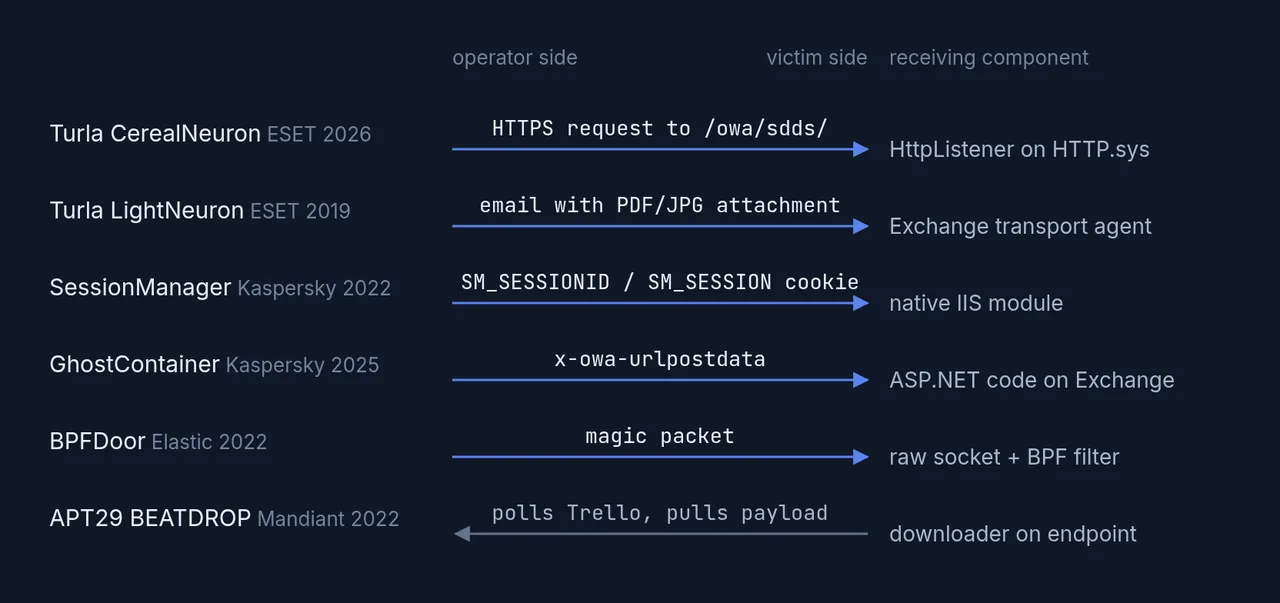
Where the commands arrive. In five of the six cases the operator connects in to a component on the victim's own server; only BEATDROP polls out, and it polls a legitimate cloud service. Sources: ESET, Kaspersky, Elastic, Mandiant. Diagram: CTI Academy.
| Operation | Where commands arrive | Best place to look |
|---|---|---|
| Turla Cereal (ESET, 2026) | HTTP.sys listener on Exchange-like URLs | HTTP.sys state, host files |
| Turla LightNeuron (ESET, 2019) | Email attachments, via a transport agent | Exchange agent list, mail flow |
| SessionManager (Kaspersky, 2022) | A cookie, read by a native IIS module | IIS module list |
| GhostContainer (Kaspersky, 2025) | A request field, read by an ASP.NET component | Exchange web files |
| BPFDoor (Elastic, 2022) | A "magic packet" seen by a raw socket filter | Linux sockets, processes |
| APT29 BEATDROP (Mandiant, 2022) | Trello, polled outbound | Cloud API use on endpoints |
A few notes on each, because the differences matter.
LightNeuron is Turla's older Exchange backdoor. ESET reported in 2019 that it ran as a malicious transport agent and took commands hidden by steganography in PDF and JPG attachments. The email itself was the control channel. Its weakness was that a registered transport agent shows up in Exchange's configuration. Cereal's CerealBox avoids exactly that by wrapping existing agents in memory. It reads like a lesson learned.
SessionManager is a native IIS module reported by Kaspersky in 2022. It reads commands from a specific cookie name and otherwise lets the request pass through as normal. Kaspersky reported it in use since at least March 2021, still deployed in more than 20 organizations as of late April 2022, and linked it, tentatively, to the GELSEMIUM actor. It lives inside IIS, so it shows up in the IIS module list. ATT&CK tracks this family of technique as T1505.004, IIS Components.
GhostContainer is a 2025 Kaspersky case. It is an Exchange backdoor built partly from open-source projects. It takes encrypted commands from a field in requests to the Exchange web application and can act as a proxy or tunnel into the internal network. Kaspersky found it at a government agency and a high-tech company in Asia.
BPFDoor is the Linux version of the same idea. It attaches a packet filter to a raw socket and stays quiet until a crafted "magic packet" arrives. Then it can open a bind shell or a reverse shell. Elastic's write-up is a good reminder that "passive" describes the waiting phase. Once activated, some passive implants do connect out.
BEATDROP is the contrast case. Mandiant described in 2022 how this APT29 downloader used Trello to retrieve encrypted payloads, including Cobalt Strike BEACON. So the wider operation did use conventional C2 later; the comparison here is only about the delivery channel. That traffic is outbound, but to a service that many organizations cannot block outright without disrupting real work. It shows the other way around classic C2 indicators: hide in a trusted destination instead of removing the connection.
There is also history. ESET notes that CerealNeuron is functionally similar to Neuron, a passive implant on mail and web servers that the UK NCSC tied to Turla in 2017. In a 2019 update, the NCSC said Neuron was very likely Iranian in origin and that Turla had obtained and used it. ESET assesses CerealNeuron as a separate family that may have drawn on Neuron. Either way, passive listeners on mail servers have been part of Turla's tradecraft for almost a decade.
The HTTP.sys Blind Spot in IIS Logs
This is the part we find most useful for defenders, and it comes from reading Microsoft's documentation next to ESET's description.
On Windows, IIS does not own port 443 by itself. Both IIS and any program using HttpListener register URL prefixes with the kernel HTTP service, HTTP.sys, and each registration is tied to a request queue (several prefixes can share one). When a request arrives, Microsoft's UrlPrefix documentation says HTTP.sys checks host categories in a fixed order (strong wildcard +, explicit host, IP-bound wildcard, weak wildcard *) and, inside the first category that matches, routes the request to the queue with the longest matching prefix. A matching reservation without a registration can also stop the search, so the real result depends on what is registered on that server.
ESET's observed prefixes use the weak wildcard: https://*:443/owa/sdds/. As far as we can tell from the documentation, an IIS site bound to all unassigned addresses on 443 registers as https://*:443/. Same category, and /owa/sdds/ is the longer match. On paper, a request for that path goes straight to the implant's queue and never reaches the IIS worker process.
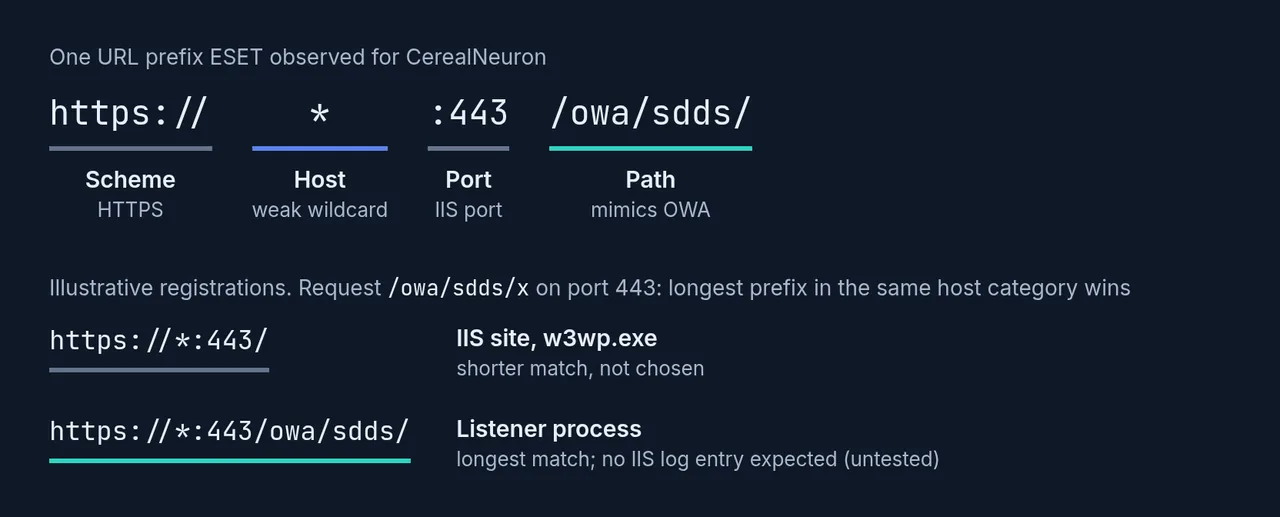
One of the URL prefixes ESET observed, broken into parts, and how HTTP.sys would pick between it and an IIS site registered on the same port. The registrations are illustrative. Under Microsoft's documented longest-match rule the listener gets the request, so neither the IIS W3C log nor the Exchange HttpProxy log should record it. This is our reading of the documentation, not a tested result. Diagram: CTI Academy.
Untested hypothesis (H0): requests that HTTP.sys routes to a non-IIS listener do not appear in the IIS W3C log for the site, or in Exchange's HttpProxy logs, because neither IIS nor the Exchange proxy module ever handles them.
If H0 holds, it has an uncomfortable consequence. A team that hunts for "weird OWA requests" in IIS logs could search perfectly and still find nothing, because the requests that matter were never written there. It also points to where the evidence should be instead: in HTTP.sys's own state, in logs from a device in front of the server, and in the response the server sends back.
Two caveats. First, the routing depends on how the site is bound. A binding on a specific IP address falls into a higher category than a weak wildcard, and that could change which queue wins. Second, we have not checked whether security products or Exchange components log at the HTTP.sys layer in a way that would catch these requests. Test before you rely on either direction.
Seven Hunting Hypotheses for Passive Backdoors
Each hypothesis below says what to look for, where the data lives, and what normal noise looks like. None of them depend on Cereal's hashes. They come from what the toolset has to do to work, so they may generalize to related implementations, though that coverage is unvalidated. Treat every one as a starting point to test on a clean server of the same build first.
H1: An Exchange-looking URL owned by the wrong process
Idea. Every HTTP.sys registration is visible. List the request queues with netsh http show servicestate and look for URLs under /owa/, /autodiscover/, /ews/ or /microsoft-server-activesync/ that belong to a process other than the IIS worker process (w3wp.exe).
# Run on each Exchange server, as administrator. Read-only.
netsh http show servicestate view=requestq verbose=yes > "$env:TEMP\httpsys-queues.txt"
Select-String -Path "$env:TEMP\httpsys-queues.txt" -Pattern 'owa|autodiscover|activesync|ews|Process IDs'
# Map every listed process ID to a name, then compare with a clean server of the same build.
Get-Process -Id <pid> | Select-Object Id, ProcessName, Path
Noise. Exchange and other Microsoft components register their own URLs, so build a baseline from a known-clean server first. What you want is a diff, not a raw list. This is the closest thing to a direct check for the Cereal-style design, and it costs nothing.
H2: URLs that reach the edge but never reach IIS
Idea. If TLS terminates on a load balancer, reverse proxy or WAF in front of Exchange, that device sees full request paths. Compare the paths it logs for your Exchange hostnames with the paths in the IIS W3C logs on the servers behind it. A path that keeps showing up at the edge but is missing from IIS deserves a look, whatever its name.
Data. Edge device access logs, IIS logs in %SystemDrive%\inetpub\logs\LogFiles\, and Exchange HttpProxy logs under the Exchange Logging\HttpProxy\ folder.
Noise. Health probes, requests the edge answers itself, and paths the edge rewrites. This hunt depends on H0 being true, so it doubles as a way to test H0 on your own data.
H3: A response that does not look like Exchange
Idea. Exchange stamps its responses with its own headers. Microsoft's documentation on instrumenting EWS and REST requests describes X-FEServer, which names the Client Access server that handled the request. A response produced by a separate HttpListener program would not normally carry Exchange's headers, and unless the program sets its own, HTTP.sys typically fills in a generic Server value. Send the same harmless request to one of ESET's paths and to a made-up baseline path on your own Exchange server, then compare status codes and headers.
# Only against servers you own and are authorized to test.
curl -sk -o /dev/null -D - -X POST https://mail.example.org/owa/sdds/
curl -sk -o /dev/null -D - -X POST https://mail.example.org/owa/zz-baseline-zz/
Noise. Builds and updates change headers, and an operator could copy Exchange's headers into the redirect. A match tells you little; a clear mismatch on one path and not the other is worth an investigation. Do not scan other organizations' servers with this. That is active probing of systems you do not own.
H4: Writes to the .NET native image cache by the wrong process
Idea. The native image cache (C:\Windows\assembly\NativeImages_v4.0.30319_64\ on 64-bit systems) is normally written by .NET's own optimization service during installs and updates. A file created there by any other process is unusual.
// Microsoft Defender XDR advanced hunting
DeviceFileEvents
| where Timestamp > ago(30d)
| where FolderPath contains @"\assembly\NativeImages_"
| where ActionType in ("FileCreated", "FileRenamed", "FileModified")
| where InitiatingProcessFileName !in~ ("ngen.exe", "ngentask.exe", "mscorsvw.exe", "TiWorker.exe", "TrustedInstaller.exe")
| project Timestamp, DeviceName, FolderPath, SHA1, InitiatingProcessFileName, InitiatingProcessCommandLine
Noise. Software installers and patching tools, which you can allow-list after review. With Sysmon, Event ID 11 (FileCreate) filtered on the same folder covers file creation and overwrites, though not every modification or rename, and your Sysmon configuration has to include that path. There is also a structural check: ESET notes that legitimate native images carry native image metadata in their .NET header, while the planted loader did not, which suggests it was copied in by hand rather than generated.
H5: WMI DLLs loaded from the wrong folder
Idea. ESET saw the loader as ncobjapi.dll and wbemcomn.dll inside System32\wbem\. ESET notes that the legitimate wbemcomn.dll lives in System32 itself, so the WMI provider host (WmiPrvSE.exe, which sits in wbem) picks up the planted copy first. That is DLL search-order hijacking. Confirm the clean layout on your own builds before alerting.
DeviceImageLoadEvents
| where Timestamp > ago(30d)
| where FolderPath startswith @"C:\Windows\System32\wbem\"
| where FileName in~ ("ncobjapi.dll", "wbemcomn.dll", "version.dll")
| project Timestamp, DeviceName, FolderPath, SHA1, InitiatingProcessFileName
Noise. Should be very low if the baseline is right. Sysmon Event ID 7 (ImageLoad) gives the same view if image-load logging is turned on, which it is not by default.
H6: The mail transport process writing files it should not
Idea. CerealBox stages collected mail in a file and, according to ESET, saves its configuration file whenever it keeps a message. Processing a message it does not keep can also trigger a save if ten minutes have passed since the last one, so the writes follow mail traffic rather than a fixed timer. EdgeTransport.exe writes queues and logs in known Exchange folders. A steady pattern of writes to a folder outside those is worth a look.
DeviceFileEvents
| where Timestamp > ago(14d)
| where InitiatingProcessFileName =~ "EdgeTransport.exe"
| where ActionType in ("FileCreated", "FileModified")
| extend Dir = tostring(parse_path(FolderPath).DirectoryPath)
// Replace with the queue and log folders you verified on a clean server of the same build
| where not(Dir contains @"\TransportRoles\data\Queue" or Dir contains @"\TransportRoles\Logs")
| summarize Writes = count(), First = min(Timestamp), Last = max(Timestamp) by DeviceName, Dir
| order by Writes desc
Noise. Antivirus scanning paths, custom transport agents you installed on purpose, and Exchange data on non-default drives. Endpoint file telemetry is not always complete for very busy processes, so a quiet result is weak evidence.
H7: Mailbox pulls that start on the Exchange server itself
Idea. The operators pulled whole mailboxes and single messages through EWS from inside the compromised server. In the EWS logs under the Exchange Logging\Ews\ folder, look for bursts of GetItem and FindItem SOAP actions under an account that is not a known service, and correlate them with the front-end HttpProxy logs under Logging\HttpProxy\Ews\. Exchange proxies requests between servers, so account for those hops before reading an Exchange-server or loopback address as code running locally.
Noise. High. Backup, archiving, journaling and migration tools do exactly this. Use it to scope a case once H1 to H6 point at a server, not as a standalone alert.
Plus one: the IoC sweep, done properly
ESET published the Cereal file hashes in its malware-ioc repository. That repository is under a BSD 2-Clause license, so you can load the hashes into your tools. If you redistribute them, keep ESET's copyright notice. Pin the commit you used (the Cereal set was added in 8921a81) so your hunt is reproducible. Sweep for the hashes, but do not stop there. The operators deliver each command as its own small assembly, and ESET infers a framework that builds and packages them, so the hash list is likely to age fast. The behaviors in H1 to H6 age much more slowly, which is the Pyramid of Pain argument in practice: hashes are trivial for an operator to change, tradecraft is not.
What These Hypotheses Cannot Tell You
Honest limits, because hunt plans that oversell themselves get ignored after the first false positive.
- None of this is tested. We did not build a lab for this post. H0, the HTTP.sys blind spot, is the one we are least sure of in practice. If you test it, we would like to hear the result.
- A clean result is not a clean server. CerealBox lives in memory inside a legitimate process. Configuration checks such as listing transport agents will look normal by design. Memory forensics on the transport process is the stronger check if you have a reason to suspect it.
- The operator's IP is still unknown. Even if you find the implant, the inbound requests may have come through other compromised hosts or anonymization services. ESET could not resolve that either. Plan for an attribution gap.
- These hunts find the Cereal design, not Turla. A different actor using a passive listener would trigger the same hunts. That is the point, but it means a hit is a starting point for analysis, not an attribution. Our post on threat actor naming covers why that distinction matters when you report it, and our types of threat intelligence guide covers who should get which version of the finding.
- Access to Exchange came first. ESET's report does not settle how the operators got in. Patching and hardening Exchange, and reducing its internet exposure, still matter more than any hunt in this list.
Turning This Into a Hunt Plan
If you want to run this as a proper intelligence-led hunt rather than a list of queries, the shape is simple.
- Write the requirement. "Are any of our internet-facing Windows servers accepting operator commands on URL paths that our web logs do not record?" That question is broader than Cereal and will outlive it.
- Pick the cheapest high-value checks first. H1 and H5 are fast, read-only and low-noise. H3 needs nothing but a shell, as long as you only test your own servers.
- Baseline before you alert. Every hypothesis here depends on knowing what a clean server of the same build looks like.
- Write down what you could not see. If you have no edge logs, H2 is impossible. That gap belongs in your report as clearly as any finding.
This is also where the living-off-the-land lesson comes back. Cereal hides inside legitimate processes, legitimate paths and legitimate features. A hunt built on legitimacy checks (right process, right folder, right owner) holds up better than one built on known-bad lists.
Build the Judgment Behind the Hunt
Reading a report like ESET's and turning it into hunts is a skill, and it is mostly judgment. You have to separate what the vendor saw from what it assessed, decide which artifacts will survive the next version, and say clearly what your data cannot show. Theory gives you the vocabulary. The judgment comes from doing it on real cases, again and again. Our free Cyber Threat Intelligence learning path is built around that kind of practice, from intelligence requirements to turning a report into action.
Frequently Asked Questions
What does hunting without C2 indicators mean?
It means looking for an intrusion when the malware does not contact an attacker-controlled server. Instead of domains, IP addresses and beacon patterns, you hunt for host artifacts and for signs that a legitimate service is behaving differently, such as an unexpected listener, a file in an unusual folder, or a mismatch between logs.
What is Turla's Cereal toolset?
Cereal is a modular .NET toolset that ESET Research disclosed on 10 November 2026 and attributed to the Russia-aligned group Turla with high confidence. It ran on Microsoft Exchange servers at government organizations in Kazakhstan and Romania, took commands through a passive HTTPS listener, and collected selected email from inside the Exchange transport process.
How does a passive backdoor receive commands without a C2 server?
A passive backdoor listens on a system that already accepts inbound connections, such as a mail or web server. The operator sends a specially built request, packet or email that only the implant recognizes. The implant acts on it and stays silent otherwise, so there is no outbound beacon or dedicated server to detect.
Why might IIS logs miss requests to a malicious HttpListener?
On Windows, HTTP.sys routes each request to the registered URL prefix with the longest match in its host category. If a program registers a longer prefix than IIS, such as a path under /owa/, Microsoft's documentation suggests the request goes to that program instead of IIS, so IIS would not log it. We have not tested this; verify it on your own servers.
How can I check an Exchange server for unexpected HTTP listeners?
Run netsh http show servicestate view=requestq verbose=yes as an administrator. It lists every HTTP.sys request queue, its registered URLs and the owning process IDs. Look for Exchange-style URLs owned by a process other than w3wp.exe, and compare the output with a known-clean server of the same build.
Can I use ESET's Cereal IoCs in my own tools?
ESET publishes its indicators in the eset/malware-ioc repository on GitHub under a BSD 2-Clause license, which allows reuse if you keep the copyright notice. That license covers the repository, not ESET's articles, figures or white papers. Hashes help, but behavior-based hunts last longer because the operators compile new binaries often.
Are passive backdoors only a problem for Exchange?
No. SessionManager targeted IIS servers, GhostContainer targeted Exchange, and BPFDoor targets Linux servers and appliances. Any internet-facing system that accepts inbound traffic can host a passive implant, which is why hunts based on listeners, process ownership and log gaps are more useful than product-specific signatures.
Sources
- ESET Research (WeLiveSecurity): Exchange for breakfast: Turla's Cereal tricks are not for kids
- ESET white paper: Exchange for breakfast (PDF)
- ESET malware-ioc repository, Turla folder at commit 8921a81
- ESET (WeLiveSecurity): Turla LightNeuron: An email too far
- Kaspersky Securelist: The SessionManager IIS backdoor
- Kaspersky Securelist: GhostContainer backdoor for Exchange servers
- Elastic Security Labs: A peek behind the BPFDoor
- Mandiant (Google Cloud): Trello From the Other Side: Tracking APT29 Phishing Campaigns
- NCSC: Turla group exploits Iranian APT to expand coverage of victims
- Microsoft Learn: UrlPrefix Strings (HTTP Server API routing)
- Microsoft Learn: netsh http
- Microsoft Learn: Instrument client requests for EWS and REST in Exchange
- MITRE ATT&CK: T1505.004 IIS Components
- MITRE ATT&CK: T1505.002 Transport Agent