
The victim did everything the security awareness training told them to. They checked the address bar. It showed Microsoft's real sign-in domain. They entered their password on the real Microsoft page. They approved the multi-factor prompt on their own phone. And at the end of it, an attacker had a working session inside their mailbox, with no password stolen and no fake login page anywhere in the chain.
That is device code phishing, and on 22 September 2026 Microsoft's Digital Crimes Unit announced that it had disrupted the platform that turned it into a mass-market crime. According to Microsoft, the service, called EvilTokens, had been linked to more than 12,000 compromised inboxes in over 10,000 organizations within months of launching in February 2026. This piece explains the technique the way a working analyst needs to understand it: what the OAuth device code flow is, why multi-factor authentication does not stop the attack, what the EvilTokens case actually showed, and how a SOC or threat intelligence team detects and blocks it.
What Device Code Phishing Is
Device code phishing is an account takeover technique that abuses the OAuth 2.0 device authorization grant, a legitimate sign-in flow, to obtain a victim's access and refresh tokens. The attacker starts a device code sign-in against the identity provider, receives a short code, and tricks the target into entering that code on the provider's real login page. The victim authenticates and completes MFA on the genuine site, and the attacker's waiting session receives the tokens. No password is exposed to the attacker, and no fake login page is involved. Because the victim's login is real, this technique defeats controls that assume the danger is a lookalike site.
If you take one idea from this article, take that one. The attack does not target the login. It targets the authorization step that happens after the login. That is why it survives defenses built to catch credential theft, and it is why it belongs in the same mental category as the token theft behind adversary-in-the-middle kits rather than in the category of classic password phishing. For the wider picture of how techniques like this feed into intelligence work, our pillar guide on what cyber threat intelligence actually is is the right first stop.
How the OAuth Device Code Flow Works, and Why It Is Phishable
The device authorization grant is a real standard, defined in RFC 8628 in August 2019. It exists for a sensible reason. Some devices cannot run a normal browser login: a smart TV, a media console, a printer, a conference room system, a command-line tool on a server. RFC 8628 describes it as a way for OAuth clients on internet-connected devices that "lack a browser to perform a user-agent-based authorization or are input constrained" to get user authorization "by using a user agent on a separate device." In plain terms, the constrained device shows you a short code, and you finish the sign-in on your phone or laptop.
Microsoft implements this on the Microsoft identity platform for smart TVs, IoT devices, printers and similar hardware. The mechanics are worth knowing precisely, because the abuse maps onto them one to one. The client posts to a /devicecode endpoint and gets back a user_code, a verification_uri (Microsoft's device login page, the microsoft.com/devicelogin address that the EvilTokens lures sent victims to), and an expiry. Per Microsoft's documentation, the user has 15 minutes to sign in before the code expires. While the user authenticates at that URL, the client polls the /token endpoint. Once the user finishes, the client receives an access token and, if it asked for offline access, a refresh token.
Now look at the design decision that makes it phishable. The device that requests the code and the browser where the user approves it are two different machines. Microsoft's own write-up puts the tradeoff plainly: "because authentication is completed on a separate device, the session initiating the request is not strongly bound to the user's original context." RFC 8628 anticipated the abuse in its security considerations. Section 5.4, titled Remote Phishing, warns that "it is possible for the device flow to be initiated on a device in an attacker's possession. For example, an attacker might send an email instructing the target user to visit the verification URL and enter the user code." The standard recommended telling the user that they are authorizing a device and confirming the device is in their possession, and it noted that short code lifetimes do not prevent "a phisher from presenting a fresh token, particularly if they are interacting with the user in real time." Seven years later, that warning is the entire attack.
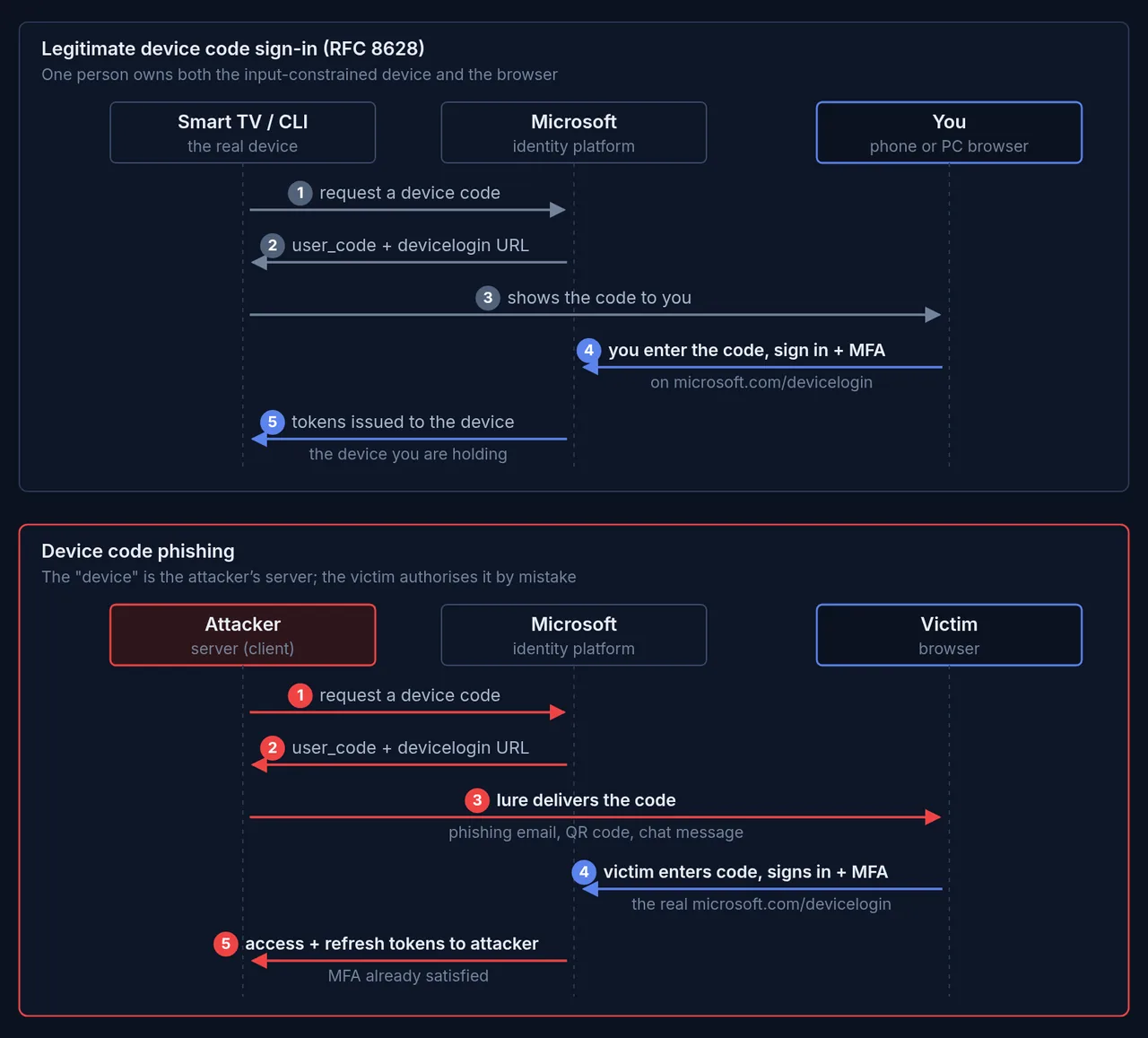
Figure 1: The same real Microsoft page appears in both flows. In the legitimate case one person owns the device and the browser. In the phishing case the "device" is the attacker's server, and the victim authorises it by mistake. Flow per Microsoft identity platform docs and RFC 8628; phishing steps per Microsoft Threat Intelligence. Diagram: CTI Academy.
The attacker's steps are the legitimate steps, run by the wrong person. They request a device code, deliver it to the victim through a phishing lure, and wait. The victim goes to the real Microsoft page, types the code, and signs in with MFA if prompted. At that moment the attacker's polling session is granted the tokens. This technique is not new. Security researchers documented it around 2020, and in February 2025 Microsoft reported that Storm-2372, an actor it assessed with moderate confidence as aligned with Russia's interests, had been running device code phishing campaigns since August 2024. What changed in 2026 is that someone turned it into a product.
Why MFA Does Not Stop It, and What the Victim Sees
Here is the part that surprises people. Multi-factor authentication is working exactly as designed during a device code phishing attack, and that is the problem. The victim really does complete MFA. They just complete it for a session that is not theirs.
The security firm Push Security, which tracked the surge in these attacks in early 2026, puts it bluntly: a device code phishing attack "cannot be prevented with authentication controls," and that includes "all forms of MFA and even 'phishing-resistant' authentication methods such as passkeys." The reason is that the authorization is effectively performed after authentication. If the victim already has an active browser session, approving the attacker's device can take nothing more than selecting their account and confirming. Even when a full sign-in is required, the attack still works, because it is not attacking the login. Phishing-resistant methods like FIDO2 security keys and passkeys defeat classic and adversary-in-the-middle phishing by binding the credential to the real domain, and they remain worth deploying. They do not stop a victim from correctly authenticating on the genuine domain and then authorising an attacker's device. Do not let a vendor tell you that passkeys alone close this gap.
What makes it convincing on the victim's side is that the last page they see is the real one. The lure is where the deception lives; the login is not. In the EvilTokens attacks Microsoft describes, the victim clicks a link in a themed email, lands on an attacker page that shows a code with a "Copy Code" button and a "Continue" or "Continue with Microsoft" button, and is then handed off to the genuine microsoft.com/devicelogin. Microsoft says the script often copies the code to the victim's clipboard automatically, so all they have to do is paste. If the victim is already signed in, pasting the code and confirming is enough; otherwise they are asked for their password and MFA, on the real page.
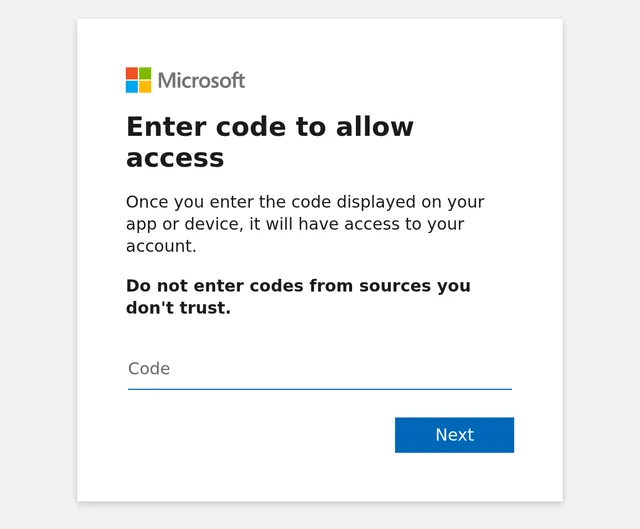
Figure 2: The legitimate Microsoft device login page, captured unauthenticated (microsoft.com/devicelogin redirects to login.microsoftonline.com). This is the real page that device code phishing abuses; the attacker relies on the victim reaching it and entering a code the attacker supplied. Note Microsoft's own warning. Source: Microsoft device login page, captured 2026-09-28.
Read the warning Microsoft prints on that page: "Do not enter codes from sources you don't trust." That line, plus a later prompt that asks the user to confirm the app they are signing in to, is the whole user-facing defense, and it is why the lures work so hard to look like a routine IT request. When entering a device code feels as normal as pasting a one-time passcode, a well-crafted lure is hard to tell from a legitimate prompt.
Which Controls Actually Stop It
The good news is that this technique has real, specific mitigations, and the most effective one is a single policy in any tenant licensed for Conditional Access. The catch is that "turn on MFA" is not it.
The strongest control is to block the device code flow where you do not need it. Microsoft's guidance is unusually direct: "Microsoft recommends blocking device code flow wherever possible." In Microsoft Entra ID you do this with a Conditional Access policy using the Authentication flows condition, setting the flow to Device code flow and the grant control to Block access. Microsoft's step-by-step guidance recommends getting "as close as possible to a unilateral block," running the policy in report-only mode first, and allowing device code flow only in documented, secured cases.
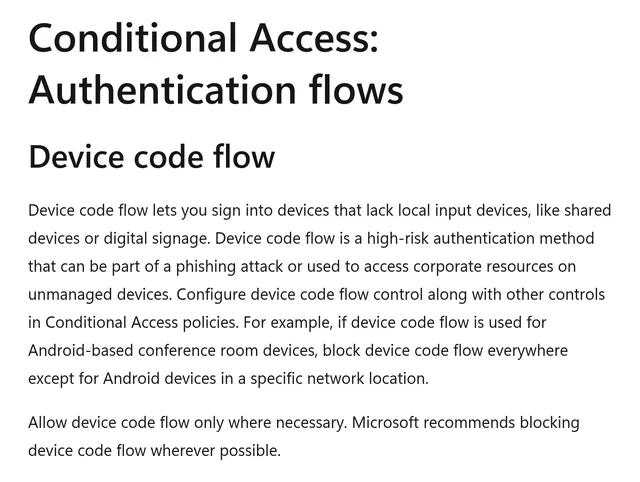
Figure 3: Microsoft's Conditional Access documentation calls device code flow a high-risk method that can be part of a phishing attack, and recommends blocking it wherever possible. Source: Conditional Access: Authentication flows, Microsoft Learn, captured 2026-09-28.
Two details separate a policy that works from one that looks like it works. First, target all resources, not a subset, as Microsoft's steps recommend; Eye Security's responders warn that a policy scoped to selected apps can be bypassed by kits that use the Microsoft Authentication Broker app. If hardware such as Teams Rooms or shared Teams devices genuinely needs device code flow, Microsoft's Teams device guidance keeps the default block and adds two narrow exceptions: a group holding only those devices' resource accounts, and an exclusion for the Device Registration Service resource so device registration keeps working. Keep those exceptions as small as Microsoft describes. Second, before you enforce, filter your sign-in logs for existing device code activity so you know who is using it legitimately, typically developers and administrators on tools like the Azure CLI. Conditional Access needs a Microsoft Entra ID P1 license (Microsoft 365 Business Premium also includes it), which is worth stating plainly because not every tenant has one.
Two more controls help, with honest limits. Token protection is a Conditional Access session control that tries to ensure only device-bound tokens, such as Primary Refresh Tokens cryptographically bound to a registered device, are accepted. It reduces the value of tokens that are not bound to a device, but per Microsoft it is enforced for native apps on only a few resources (Exchange Online, SharePoint Online, Teams and, on Windows, Azure Virtual Desktop and Windows 365), with browser support a preview for selected Azure Resource Manager web apps. And because it checks that a token is bound to the device presenting it, it does not stop an attacker who registers a device of their own and obtains a Primary Refresh Token for it, which is exactly the persistence step Microsoft saw EvilTokens operators take. Treat it as defense in depth, not a complete answer. Compliant-device requirements in Conditional Access raise the bar similarly, by requiring the connection to come from a managed device. Neither of these is the same as "MFA is on."
The EvilTokens Case: What Microsoft Actually Disclosed
Separate what Microsoft stated from what is reasonable inference, because on a day-one disruption the two blur quickly.
What Microsoft stated: EvilTokens emerged in February 2026 and became, in Microsoft's words, "one of the most widely used phishing-as-a-service (PhaaS) platforms." Microsoft tracks the actor behind its development and support as Storm-2992. The platform was sold on Telegram for a $1,500 initial purchase plus a $500 monthly subscription, with add-ons such as an anti-bot redirector and mail-sending tools charged separately. It offered 44 lure themes, hosted redirect logic on high-reputation platforms like Vercel, Cloudflare Workers and AWS Lambda to blend in, and generated device codes dynamically so the 15-minute expiry window started only when the victim clicked. Microsoft observed the highest concentrations of victim activity in the United States, Canada, the United Kingdom, Australia, India and France, across sectors from wholesale distribution and construction to financial services, real estate, higher education and healthcare.
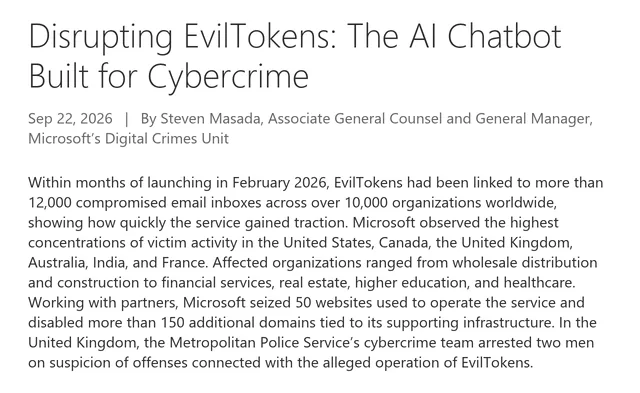
Figure 4: Microsoft's Digital Crimes Unit disclosing the EvilTokens disruption: more than 12,000 compromised email inboxes across over 10,000 organizations, 50 websites seized, 150-plus domains disabled, and two arrests in the UK. Source: Disrupting EvilTokens, Microsoft On the Issues, captured 2026-09-28.
The part that makes this case a milestone is the AI. According to Microsoft's Digital Crimes Unit, at the center of the service was "an AI-style chatbot that could analyze a victim's inbox" and help criminals identify trusted relationships, payment authorizations and sensitive responsibilities, then recommend fraud strategies and draft impersonation messages. Microsoft's threat intelligence write-up adds that attackers used the stolen tokens for Microsoft Graph reconnaissance to map the organization, used the EvilTokens AI to filter for targets in financial, executive or administrative roles, and searched the mail of users with financial authority for wire-transfer details, pending invoices and executive correspondence. Microsoft also states that investigators found evidence that large portions of EvilTokens had been "vibe coded" with AI assistance. The DCU called the action its 40th court-authorized disruption and its first against an end-to-end AI-enabled cybercrime service.
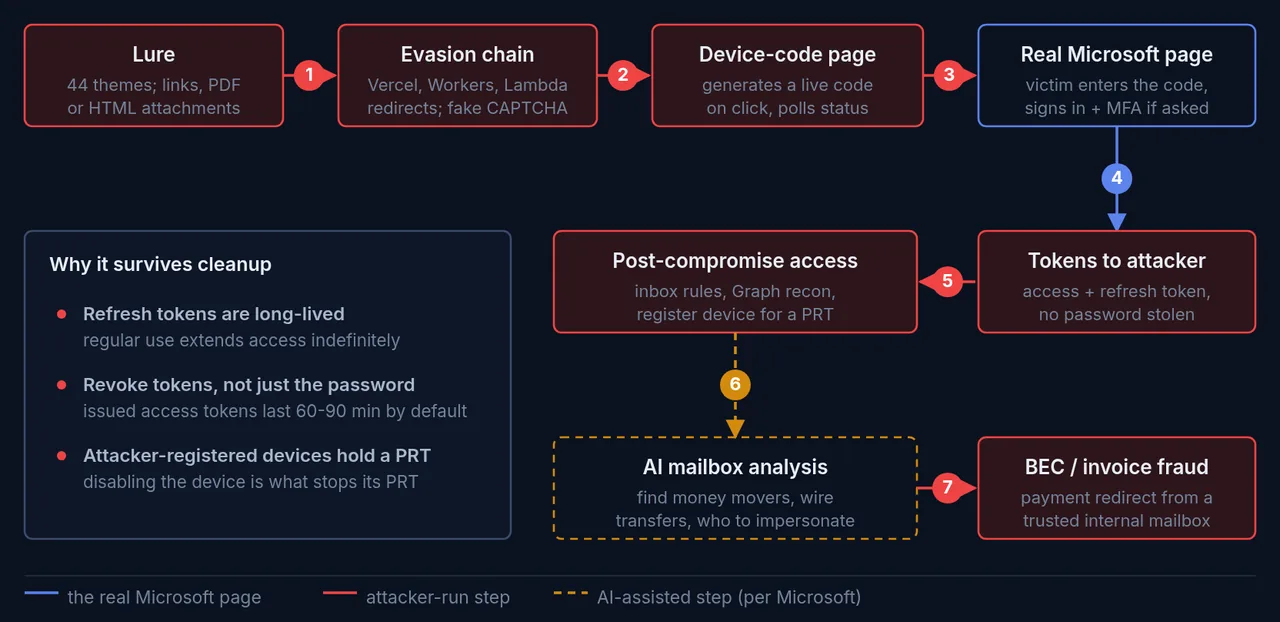
Figure 5: The EvilTokens chain, lure to business email compromise. The one blue step is the real Microsoft page the victim trusts; the amber step is the AI-assisted mailbox analysis Microsoft highlighted. Sources: Microsoft Threat Intelligence and Digital Crimes Unit, Sekoia and SpyCloud reporting, 2026; token lifetimes per Microsoft Learn. Diagram: CTI Academy.
With authorization from the US District Court for the Eastern District of Virginia, Microsoft and co-plaintiff Health-ISAC worked with Cloudflare, Coinbase, OpenAI, Railway, SpyCloud, the Shadowserver Foundation and TRM Labs; Microsoft seized 50 websites used to run the service and disabled more than 150 additional domains. In the UK, the Metropolitan Police Service's cybercrime team arrested two men, aged 32 and 38, and both were released on police bail while the investigation continues. The Record reported that the Met said they were held on suspicion of making articles for use in fraud and money laundering offences. The arrest date differs by source: Microsoft's blog gives 11 September 2026, while reports citing the Met, published on 22 September, said the warrants were executed the previous Friday, which The Register gave as 18 September. SpyCloud, one of the partners, published its own numbers: its recaptured dataset showed at least 8,708 compromised accounts across 6,585 corporate email domains in 79 countries, with 97.5 percent belonging to enterprise domains, a strong sign that the targeting was overwhelmingly corporate.
One honest caveat, which Microsoft makes itself: the infrastructure has been disrupted, but in the DCU's words "the model it demonstrated will not disappear with it." BleepingComputer reported that this was not a takedown operation, that the threat remains active though attack volume should drop, and that affiliates have already produced clones. EvilTokens was also not the only kit; by April 2026, per the same report, at least ten phishing platforms supported the technique. It was, in SpyCloud's assessment, the first widely available commodity PhaaS platform to offer device code phishing, which is what makes its disruption meaningful.
How SOC and CTI Analysts Detect It
Blocking the flow is prevention. You still need detection, both for the tenants where a full block is not yet possible and for the window before your policy is enforced. The good news is that device code phishing leaves specific, queryable traces in Microsoft Entra sign-in logs.
The single most useful field is the authentication protocol. In the Entra sign-in logs and the underlying SigninLogs table, the AuthenticationProtocol field records the grant type, and its possible values include deviceCode. Any device code sign-in shows up there. The complication, as incident responders at Eye Security documented, is that plenty of tenants have legitimate device code usage, so a raw filter is a starting point, not a verdict. The same table has an OriginalTransferMethod column, the "original transfer method" that Microsoft's Conditional Access documentation describes: it records the transfer method that started a session and carries it through all subsequent requests (in the Microsoft Graph sign-in schema the value is deviceCodeFlow), which helps when you need to follow a device code session into later, non-interactive token use.
A minimal, defensive starting query looks like this. Test it in your own tenant before you rely on it, and expect legitimate hits to filter out.
SigninLogs
| where AuthenticationProtocol == "deviceCode"
| project TimeGenerated, UserPrincipalName, AppDisplayName,
          ResourceDisplayName, IPAddress, UserAgent, ResultType
| sort by TimeGenerated desc
From there, the signals that separate an attack from a developer signing into a CLI are the ones that come from the split nature of the flow:
- The application is one that should not use device code. Eye Security flags the "Microsoft Office" first-party app, which it says does not normally use device code, and the "Microsoft Authentication Broker" app, which can register a device and where device code use is rare outside hardware like conferencing equipment.
- The authorization and the later activity come from different places. Push Security suggests looking for different IP addresses on the authorization grant and on the account activity that follows. Eye Security adds that the session ID can be shared between the victim and the attacker in device code cases, so IP address and user agent are what separate the attacker's tokens from the user's.
- A new device appears right after. Microsoft saw EvilTokens operators register new devices within 10 minutes in some cases, to obtain a Primary Refresh Token for durable access. Eye Security reports that such devices often carry a name like
DESKTOP-followed by six or eight hexadecimal characters, unlike the Windows default of seven alphanumeric characters. - An inbox rule is created shortly after. In Microsoft Defender's
CloudAppEventstable, watch forNew-InboxRuleoperations from an account soon after a device code sign-in, a classic business email compromise persistence step, along with any sudden spike in Microsoft Graph API calls.
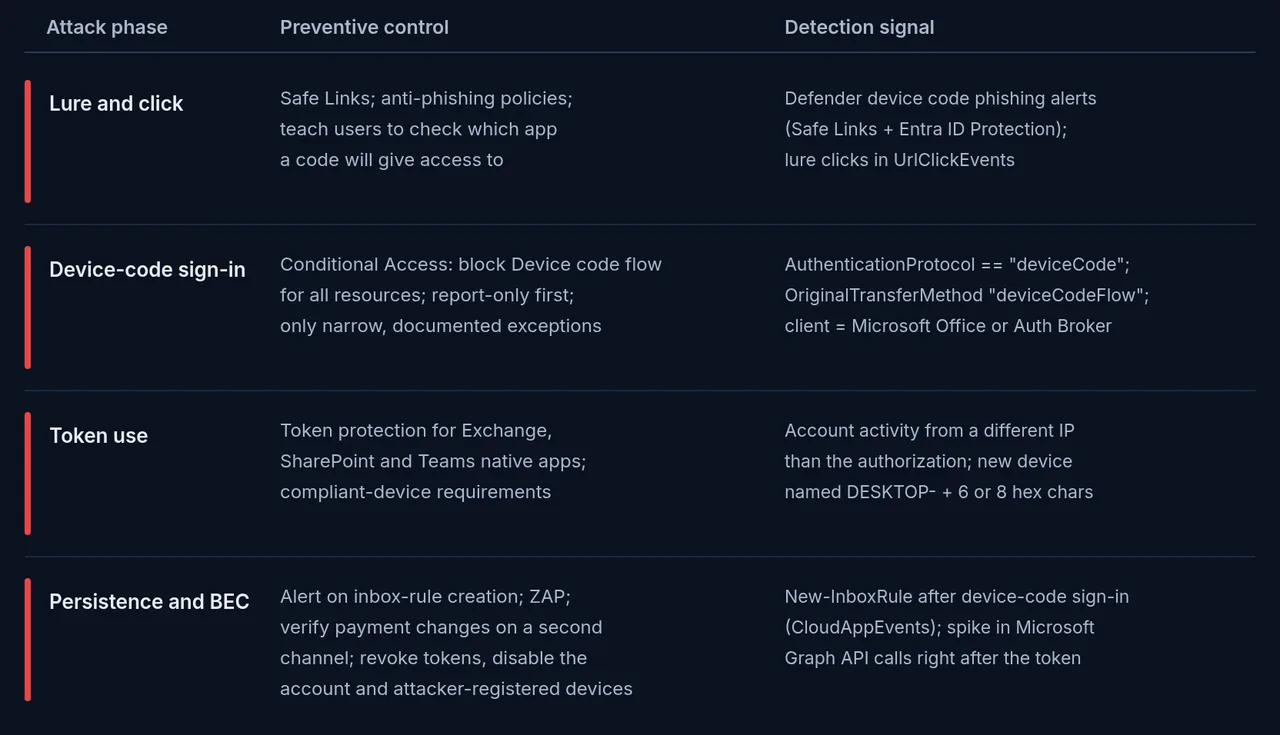
Figure 6: What to block and what to hunt for, by phase. Field names such as AuthenticationProtocol and OriginalTransferMethod are from Microsoft's SigninLogs and Graph sign-in schemas; controls are from Microsoft Learn and Microsoft Threat Intelligence; the client-app and device-name signals are from Eye Security. Test any query in your own tenant. Diagram: CTI Academy.
If you do find a compromise, remediation order matters, and it is a place teams get burned. A password reset alone may not end the attack: Microsoft warns that EvilTokens access "could persist even after a password reset if the associated sessions and tokens were not also revoked." Microsoft's guidance is to revoke the user's refresh tokens (revokeSignInSessions) and, because it observed that standard session revocation "often only invalidates refresh tokens, leaving existing access tokens active for up to an hour" (the default access token lifetime is 60 to 90 minutes), to temporarily disable the compromised account for immediate containment. Then look for any device the attacker registered. Microsoft's advice for a compromised refresh token is to disable the device as well as revoke the tokens, because disabling the device is what stops its Primary Refresh Token from working.
Turning It Into Intelligence
Detection is where a SOC's job peaks; for a threat intelligence team the work is just starting. A single blocked device code sign-in is an event. The intelligence question is what it means for your organization and what you do differently because of it.
Start with priority intelligence requirements. A few that this threat raises for most enterprises: Is device code flow enabled in our tenant, and who uses it legitimately? Which Microsoft client apps, such as Microsoft Office or the Authentication Broker, show device code sign-ins in our logs, and should they? Do we have alerting on inbox-rule creation and on device registration events? Are our finance and executive mailboxes, the ones EvilTokens hunted for, under tighter monitoring than the rest? Answering those turns a headline into a gap analysis you can act on.
Then decide what to share and how. This is where the Traffic Light Protocol earns its place. If you are circulating internal detections, indicators or the fact that a specific executive was targeted, mark it TLP:AMBER or tighter so it stays inside the people who need it; the generic technique write-up you can share more widely. Getting the marking right is the difference between useful sharing and an own goal. When you write the assessment up, keep the estimative language honest, and if you want a template for that, our guide on writing a threat intel report nobody ignores covers how to carry uncertainty without burying the finding.
For hunting leads, remember what device code phishing is upstream of. It is an initial-access technique, and stolen Microsoft 365 access is a commodity that gets sold and reused, which is exactly the economy we map in our piece on the initial access broker ecosystem. The lures that start it lean on the same persuasion levers as every other social engineering campaign, covered in our breakdown of the psychological tactics used in social engineering. And where the same operators also drop credential-stealing malware, the fallout shows up in stealer logs and combolists, the subject of our explainer on infostealer malware. Device code phishing does not live in isolation; it plugs into all of it.
It is also worth separating the criminal wave from the state-aligned one, because they call for different watchlists. EvilTokens and Storm-2992 are financially motivated cybercrime. But the first widely reported in-the-wild campaigns were state-linked. Microsoft tracked Storm-2372, which it assessed with moderate confidence as aligned with Russia's interests and in a July 2026 update as an initial access sub-cluster of Midnight Blizzard, targeting governments, NGOs and many industries from August 2024. Volexity separately documented several Russian threat actors, at least one of which it linked with medium confidence to CozyLarch (APT29), using the technique from January 2025. Proofpoint has since tracked both state-aligned and financially motivated clusters, including a criminal actor it calls TA2723, adopting the same technique. Same mechanism, very different operators. This is the kind of naming and attribution nuance that keeps a watchlist from mixing unrelated threats, a habit worth building whichever way you enter the field, from SOC analyst to CTI analyst.
Honest Caveats
An honest write-up says where the edges are.
The victim numbers come from different measurements and should not be added together. "More than 12,000 inboxes in over 10,000 organizations" is Microsoft's count. SpyCloud's 8,708 accounts across 6,585 corporate email domains in 79 countries is what that one partner saw in its own recaptured data, a separate and partial view rather than a slice of Microsoft's figure. The country rankings differ too: Microsoft saw the highest concentrations of victim activity in the US, Canada, the UK, Australia, India and France, while SpyCloud's recaptured data ranked the US, then Canada, Australia, the UK, Saudi Arabia and India. These are consistent in shape, not identical in detail, which is normal when two organizations measure the same thing with different visibility.
The financial figures are narrower still. Coinbase, one of the disruption partners, said it traced roughly $1.1 million in platform revenue across four Tron addresses between October 2025 and June 2026, from more than 1,000 deposits, as reported by The Hacker News. That is money paid to the service, not the fraud losses its customers went on to cause, and we found no public figure for those. Do not conflate the two.
Attribution is bounded. Storm-2992 is Microsoft's designation for the activity cluster behind the kit's development and support, not a criminal indictment. The two men arrested in the UK were described by Microsoft as alleged operators and in press reports as suspected administrators; when the arrests were announced on 22 September both had been released on bail while the investigation continued, and no charges had been announced. And the disruption is exactly that, a disruption. Clones already exist, the technique is not patched because it is not a vulnerability, and the broader trend is not going to reverse because of one operation: by spring 2026, Push Security reported a 37.5-fold increase in the device code phishing pages its researchers had detected that year.
Build the Judgment to Investigate This
Anyone can repeat "attackers bypassed MFA." The analyst's job starts at "how, how sure are we, and what do we change on Monday." That means reading a sign-in log for the difference between a developer's CLI login and a stolen session, knowing that a password reset may not end the attack, and turning a vendor disclosure into a Conditional Access policy and three detection queries someone can deploy.
Theory teaches you the frameworks. Judgment comes from reps: working a real reported-phishing queue, deciding which messages are attacks and which are the benign mail every queue is full of, and running the response on both the victim side and the brand side. That is what CTI Academy's Phishing Investigation and Email Threat Analysis path is built around. Its live curriculum runs four sections, ten modules and five hands-on missions across roughly nine hours. Its response section teaches the rule this attack enforces, revoking sessions before anything else once a sign-in has already happened rather than relying on a password reset, and a Phishing Triage simulator asks for ten correct verdicts on a bank of real-looking mail. If you want to build the judgment on real cases, that is where to start.
Figure 7: The CTI Academy Phishing Investigation and Email Threat Analysis path, an intermediate track of four sections, ten modules and five hands-on missions whose response section covers recovering accounts after a session has already been stolen. Source: CTI Academy phishing investigation path (ctiacademy.io/learning-paths/phishing-investigation), captured 2026-09-28.
Frequently Asked Questions
What is device code phishing?
Device code phishing is an account takeover technique that abuses the OAuth 2.0 device authorization grant. The attacker starts a device code sign-in, sends the resulting code to a victim through a phishing lure, and the victim enters it on the identity provider's real login page. The victim authenticates and completes MFA on the genuine site, and the attacker's waiting session receives the account's access and refresh tokens, without the attacker ever seeing the password.
How does device code phishing bypass MFA?
It does not break MFA; it sidesteps it. The victim genuinely completes multi-factor authentication, but for a session that belongs to the attacker. The device code flow separates the device requesting access from the browser where the user approves it, so the approval, complete with MFA, authorises the attacker's device. Because the attack targets the authorization step rather than the login, it works even when strong MFA is enforced.
Do passkeys or FIDO2 keys stop device code phishing?
Not on their own. Phishing-resistant methods like FIDO2 security keys and passkeys defeat classic and adversary-in-the-middle phishing by binding the credential to the real domain, and they are still worth deploying. But in device code phishing the victim authenticates correctly on the genuine domain and then authorises the attacker's device, so the authorization is granted after a legitimate, phishing-resistant login. Push Security states directly that authentication controls, passkeys included, cannot prevent this attack.
What is EvilTokens?
EvilTokens was a phishing-as-a-service platform, tracked by Microsoft as the work of an actor it calls Storm-2992, that commoditized device code phishing against Microsoft 365. It emerged in February 2026, was sold on Telegram for a $1,500 initial fee plus $500 a month, and added AI features that analysed compromised inboxes to plan business email compromise. On 22 September 2026 Microsoft's Digital Crimes Unit announced that it had disrupted the service, seizing 50 websites and disabling over 150 domains, and UK police had arrested two men.
How do I block device code flow in Microsoft 365?
In Microsoft Entra ID, create a Conditional Access policy that uses the Authentication flows condition set to Device code flow, with the grant control set to Block access, applied to all resources. Microsoft recommends blocking it wherever possible and testing in report-only mode first. If Teams devices genuinely need it, Microsoft's guidance keeps the block and excludes only those devices' resource accounts plus the Device Registration Service resource. Conditional Access requires a Microsoft Entra ID P1 license.
How do defenders detect device code phishing in sign-in logs?
Filter Microsoft Entra sign-in logs, or the SigninLogs table, where AuthenticationProtocol equals deviceCode, and use OriginalTransferMethod to follow protocol-tracked sessions. Because legitimate device code use exists, prioritise the suspicious cases: a client application that should not use device code such as Microsoft Office, account activity from a different IP address than the authorization, a newly registered device, and inbox-rule creation shortly afterward. Always test any query in your own tenant.
How is device code phishing different from adversary-in-the-middle phishing?
Adversary-in-the-middle phishing proxies a fake login page in front of the real one to capture the session as the victim types. Device code phishing uses no fake login page at all: the victim signs in on the genuine provider site, and the attacker obtains tokens through the legitimate device authorization flow. That makes device code phishing harder for email and network tools to catch, because there is no lookalike login domain or fake login form to flag, only a lure page and a code the victim was tricked into entering.
Was anyone arrested for EvilTokens?
Yes. The UK Metropolitan Police Service's cybercrime team arrested two men, aged 32 and 38, after intelligence sharing with Microsoft's Digital Crimes Unit. The Met said they were arrested on suspicion of making articles for use in fraud and money laundering offences, and both were released on bail while the investigation continues. Microsoft dates the arrests to 11 September 2026; reporting that cites the Met places them on 18 September.
Sources
Primary and official - Microsoft Threat Intelligence: Unmasking EvilTokens, getting to the root of device code phishing (22 Sep 2026) - Microsoft On the Issues: Disrupting EvilTokens, the AI chatbot built for cybercrime (22 Sep 2026) - Microsoft Security: Inside an AI-enabled device code phishing campaign (6 Apr 2026) - Microsoft Security: Storm-2372 conducts device code phishing campaign (13 Feb 2025) - RFC 8628: OAuth 2.0 Device Authorization Grant (Aug 2019) - Microsoft identity platform: OAuth 2.0 device authorization grant flow - Microsoft Learn: Conditional Access, Authentication flows - Microsoft Learn: Block authentication flows with Conditional Access policy - Microsoft Learn: Restrict device code flow for Microsoft Teams devices with Conditional Access - Microsoft Learn: How Token Protection enhances Conditional Access policies - Microsoft Learn: SigninLogs table reference (AuthenticationProtocol, OriginalTransferMethod) - Microsoft identity platform: Access tokens (token lifetime) - Microsoft Learn: Understanding Primary Refresh Token (PRT) in Microsoft Entra ID
Reporting and research - BleepingComputer: EvilTokens PhaaS disrupted after compromising 12,000 Microsoft accounts - The Hacker News: Microsoft takes down EvilTokens device-code phishing service tied to 12,000 inbox compromises - The Register: UK cops arrest 2 EvilTokens suspects, Microsoft seizes 50 phishing kit websites - The Record: Two arrested in UK after Microsoft takedown of EvilTokens AI chatbot for cybercriminals - SpyCloud: See No EvilTokens, disrupting the EvilTokens PhaaS platform - Push Security: Analyzing the rise in device code phishing attacks in 2026 - Sekoia: EvilTokens kit, device code phishing-as-a-service (part 1) - Eye Security: Device code phishing forensics - Proofpoint: Access granted, phishing with device code authorization for account takeover - Volexity: Multiple Russian threat actors targeting Microsoft device code authentication